In this tutorial, we’ll build TrophyFitness, a consumer fitness application that tracks running, cycling, and swimming. We’ll implement a complete gamification loop including weekly leaderboards, habit-forming streaks, and a leveled progression system. If you want to skip straight to the code, check out the example repository or the live demo.

Table of Contents

Tech Stack

Prerequisites

  • A Trophy account (sign up here).
  • Node.js 18+ installed.

Setup & Installation

First, clone the starter repository or create a new Next.js app:
npx create-next-app@latest trophy-fitness
Install the required dependencies:
npm install @trophyso/node lucide-react clsx tailwind-merge
Configure your environment variables in .env.local:
TROPHY_API_KEY=your_api_key_here

Designing the Data Model

For a multi-sport fitness app, we need to normalize efforts. A 10km cycle is not the same as a 10km run. We’ll use three distinct metrics to track raw data, and a unified XP system for progression.

1. The Metrics

We will track distance as the primary value.
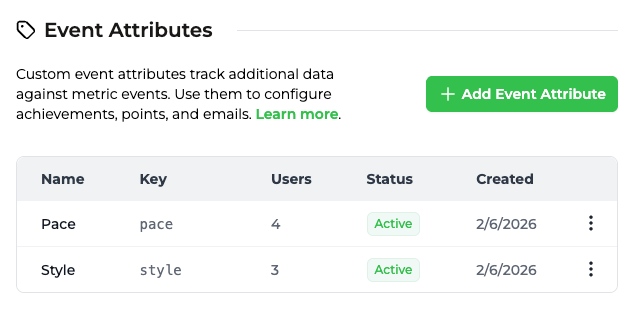
  • distance_run (km) - with pace attribute (walk/run).
  • distance_cycled (km)
  • distance_swum (m) - with style attribute (freestyle/breaststroke).

2. The Attributes

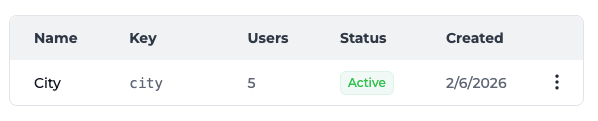
To enable local leaderboards, we’ll tag every user with a city attribute.

How Trophy Works

Before diving into the code, let’s understand how Trophy powers our gamification layer. In Trophy, Metrics represent different interactions users can make and drive features like Achievements, Streaks, and Emails. When events are recorded for a specific user, any achievements linked to the specified metric will be unlocked if the requirements are met, streaks will be automatically calculated, leaderboards will update, and any configured emails will be scheduled. This is what makes building gamified experiences with Trophy so powerful—it does all the work behind the scenes.

Setting Up Trophy

Here’s how we’ll configure Trophy for our fitness app:
Head into the Trophy metrics page and create three metrics:
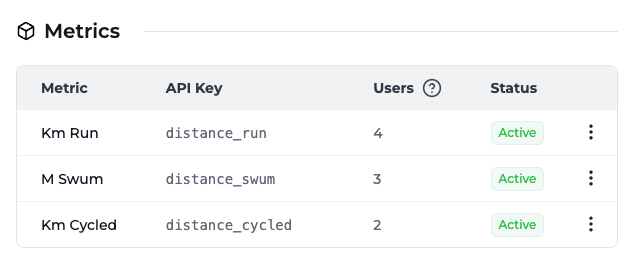
  • distance_run — Total kilometers run
  • distance_cycled — Total kilometers cycled
  • distance_swum — Total meters swum
These keys are what we’ll reference in our code when sending events.
While still on the metrics page, set up the pace and style event attributes:
Then, go to the user attributes page and create the city user atribute:
Head into the Trophy achievements page and create milestone achievements for each sport. For example:Running:
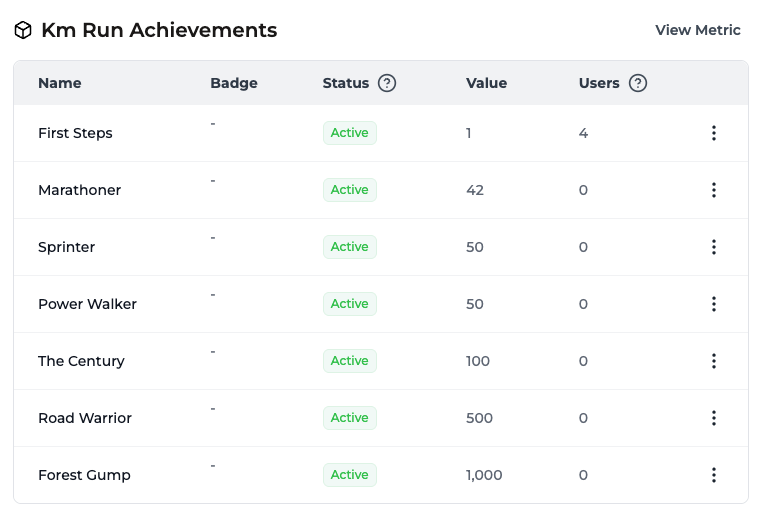
  • First 5K (5km total)
  • Half Marathon Hero (21.1km total)
  • Marathon Master (42.2km total)
Cycling:
  • Century Rider (100km total)
  • Tour Stage (200km total)
Swimming:
  • Pool Regular (1000m total)
  • Open Water Ready (5000m total)
Link each achievement to the appropriate metric.
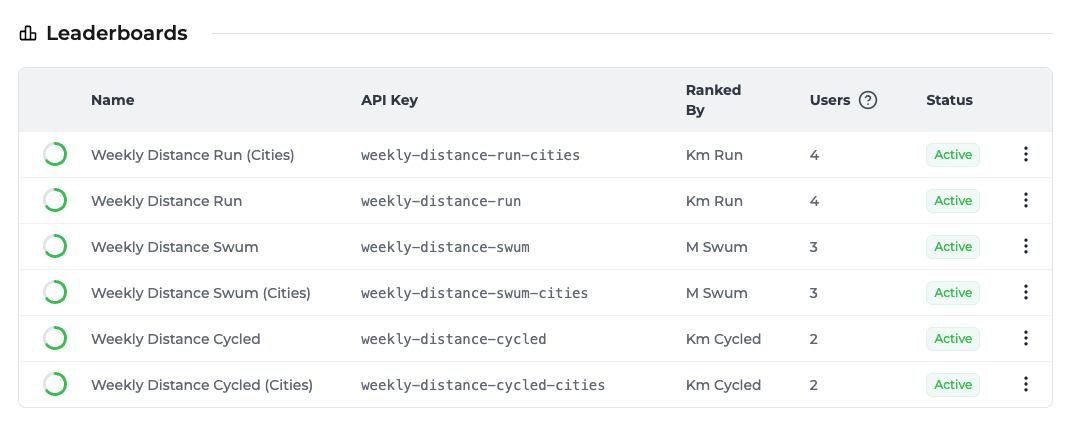
Head to the leaderboards page and set up weekly leaderboards to drive competition. Each leaderboard should be configured with Repetition Unit: Days and Repetition Interval: 7 to repeat weekly.
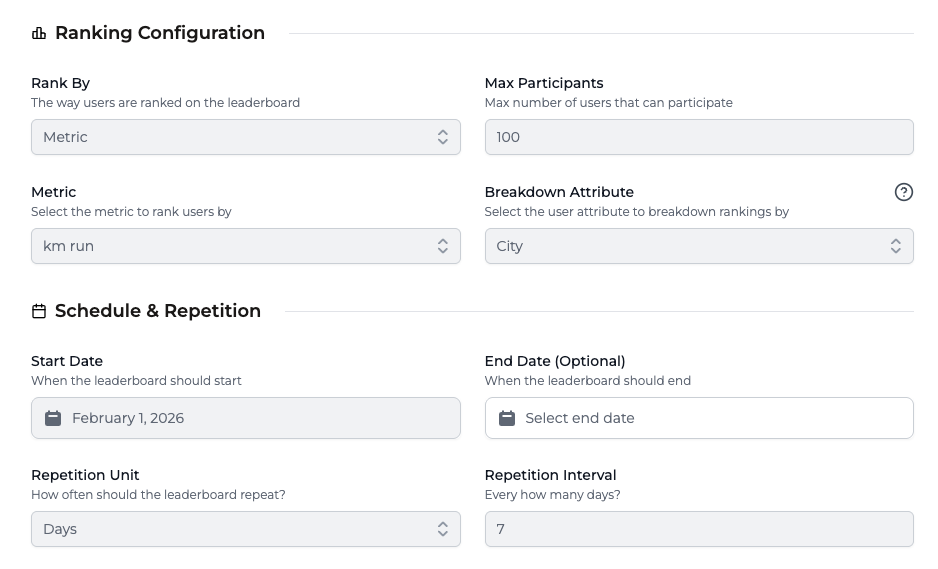
Global leaderboards:
  • weekly-distance-run
  • weekly-distance-cycled
  • weekly-distance-swum
City-based leaderboards (breakdown by user attribute city):
  • weekly-distance-run-cities
  • weekly-distance-cycled-cities
  • weekly-distance-swum-cities
Head to the points page and create a points system called xp that awards points based on activity:
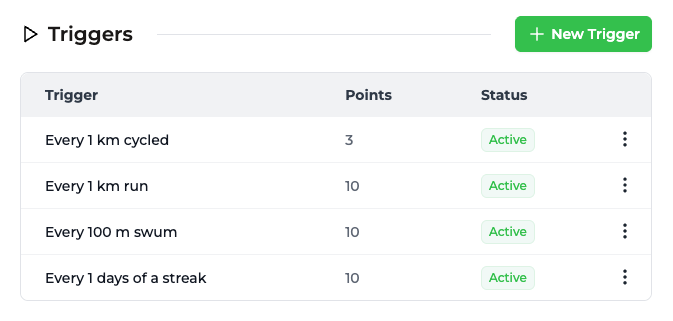
  • Running: 10 XP per km
  • Cycling: 3 XP per km
  • Swimming: 10 XP per 100m
This normalized approach ensures fair progression across sports.
Head to the streaks page and configure a daily streak linked to any of the distance metrics. Users will maintain their streak by logging at least one activity per day.
Head to the emails page and enable automated engagement emails:
  • Achievement unlocked — Celebrate new badges
  • Streak at risk — Remind users before they lose their streak
  • Weekly recap — Summary of progress and leaderboard position
Configure your branding in the branding page for professional emails.

Server Actions

We’ll create a src/app/actions.ts file to handle all interactions with the Trophy API. This keeps our API keys secure and allows us to leverage Next.js Server Actions.
src/app/actions.ts
"use server";

import { TrophyApiClient, TrophyApi } from "@trophyso/node";
import { revalidatePath } from "next/cache";

const trophy = new TrophyApiClient({
  apiKey: process.env.TROPHY_API_KEY as string,
});

export async function identifyUser(userId: string, name?: string, tz?: string) {
  try {
    const user = await trophy.users.identify(userId, { name, tz });
    return { success: true, user };
  } catch (error) {
    return { success: false, error: "Failed to identify user" };
  }
}

export async function updateUserCity(userId: string, city: string) {
  try {
    await trophy.users.update(userId, { attributes: { city } });
    revalidatePath("/leaderboards");
    revalidatePath("/profile");
    return { success: true };
  } catch (error) {
    return { success: false, error: "Failed to update city" };
  }
}

export async function getUserStats(userId: string) {
  try {
    // Fetch all user data in parallel
    const [streak, achievements, metrics] = await Promise.all([
      trophy.users.streak(userId).catch(() => null),
      trophy.users
        .achievements(userId, { includeIncomplete: "true" })
        .catch(() => []),
      trophy.users.allMetrics(userId).catch(() => []),
    ]);

    // Try to get points (XP)
    let pointsResponse = null;
    try {
      pointsResponse = await trophy.users.points(userId, "xp");
    } catch {
      // Points system might not be configured yet
    }

    return { streak, achievements, points: pointsResponse, metrics };
  } catch (error) {
    console.error("Failed to fetch user stats:", error);
    return null;
  }
}

export async function logActivity(params: {
  type: "run" | "cycle" | "swim";
  distance: number;
  userId: string;
  city?: string;
  pace?: string;
  style?: string;
}) {
  const { type, distance, userId, city, pace, style } = params;

  let metricKey = "";
  const eventAttributes: Record<string, string> = {};

  switch (type) {
    case "run":
      metricKey = "distance_run";
      if (pace) eventAttributes.pace = pace;
      break;
    case "cycle":
      metricKey = "distance_cycled";
      break;
    case "swim":
      metricKey = "distance_swum";
      if (style) eventAttributes.style = style;
      break;
  }

  try {
    // Log the event
    const response = await trophy.metrics.event(metricKey, {
      user: {
        id: userId,
        ...(city ? { attributes: { city } } : {}),
      },
      value: distance,
      ...(Object.keys(eventAttributes).length > 0
        ? { attributes: eventAttributes }
        : {}),
    });

    revalidatePath("/");
    revalidatePath("/leaderboards");
    revalidatePath("/profile");

    return { success: true, data: response };
  } catch (error) {
    console.error("Failed to log activity:", error);
    return { success: false, error: "Failed to log activity" };
  }
}

export async function getLeaderboard(leaderboardKey: string, city?: string) {
  try {
    const response = await trophy.leaderboards.get(leaderboardKey, {
      userAttributes: city ? `city:${city}` : undefined,
    });
    return response.rankings || [];
  } catch (error) {
    return [];
  }
}

export async function getRecentActivities(userId: string) {
  // Fetch daily summaries for the last 30 days
  const endDate = new Date().toISOString().split("T")[0];
  const startDate = new Date(Date.now() - 30 * 24 * 60 * 60 * 1000)
    .toISOString()
    .split("T")[0];

  const metrics = [
    { key: "distance_run", type: "run", unit: "km" },
    { key: "distance_cycled", type: "cycle", unit: "km" },
    { key: "distance_swum", type: "swim", unit: "m" },
  ];

  try {
    const summaries = await Promise.all(
      metrics.map(async (metric) => {
        try {
          const data = await trophy.users.metricEventSummary(
            userId,
            metric.key,
            {
              aggregation: "daily",
              startDate,
              endDate,
            },
          );
          return data
            .filter((item) => item.change > 0)
            .map((item) => ({
              id: `${metric.key}-${item.date}`,
              type: metric.type,
              value: item.change,
              unit: metric.unit,
              date: item.date,
            }));
        } catch {
          return [];
        }
      }),
    );

    return summaries
      .flat()
      .sort((a, b) => new Date(b.date).getTime() - new Date(a.date).getTime())
      .slice(0, 5);
  } catch {
    return [];
  }
}

// Helper to get User ID from cookies
export async function getUserIdFromCookies() {
  const { cookies } = await import("next/headers");
  const cookieStore = await cookies();
  return cookieStore.get("trophy-fitness-user-id")?.value ?? null;
}

The Leveling System

To normalize progress across different sports, we’ll map XP to Levels locally. Create src/lib/constants.ts:
src/lib/constants.ts
export const LEVELS = [
  { level: 1, xpThreshold: 0, name: "Rookie" },
  { level: 2, xpThreshold: 100, name: "Active" },
  { level: 3, xpThreshold: 500, name: "Mover" },
  { level: 4, xpThreshold: 2500, name: "Athlete" },
  { level: 5, xpThreshold: 10000, name: "Pro" },
] as const;

export function getLevelInfo(xp: number) {
  // Find current level based on XP
  let currentLevelIndex = 0;
  for (let i = LEVELS.length - 1; i >= 0; i--) {
    if (xp >= LEVELS[i].xpThreshold) {
      currentLevelIndex = i;
      break;
    }
  }

  const currentLevel = LEVELS[currentLevelIndex];
  const nextLevel =
    currentLevelIndex < LEVELS.length - 1
      ? LEVELS[currentLevelIndex + 1]
      : null;

  // Calculate progress %
  const xpInCurrentLevel = xp - currentLevel.xpThreshold;
  const xpRequiredForNextLevel = nextLevel
    ? nextLevel.xpThreshold - currentLevel.xpThreshold
    : 0;
  const progressToNextLevel = nextLevel
    ? (xpInCurrentLevel / xpRequiredForNextLevel) * 100
    : 100;

  return {
    currentLevel,
    nextLevel,
    progressToNextLevel,
    xpInCurrentLevel,
    xpRequiredForNextLevel,
  };
}

Building the Dashboard

The dashboard aggregates all user stats. We fetch data server-side and calculate the level progress before rendering.
src/app/page.tsx
import {
  getUserStats,
  getUserIdFromCookies,
  getRecentActivities,
} from "./actions";
import { getLevelInfo } from "@/lib/constants";
import {
  Zap,
  Flame,
  Footprints,
  Bike,
  Waves,
  Trophy,
  TrendingUp,
} from "lucide-react";
import { Card, CardContent } from "@/components/ui/card";
import { Progress } from "@/components/ui/progress";
import { Button } from "@/components/ui/button";
import { LogActivityDialog } from "@/components/log-activity-dialog";

export default async function Dashboard() {
  const userId = await getUserIdFromCookies();
  const [stats, recentActivities] = await Promise.all([
    getUserStats(userId ?? ""),
    getRecentActivities(userId ?? ""),
  ]);

  const streakLength = stats?.streak?.length ?? 0;
  const totalXP = stats?.points?.total ?? 0;
  const levelInfo = getLevelInfo(totalXP);

  // Helper to get total for a metric key
  const getMetricTotal = (key: string) =>
    stats?.metrics?.find((m) => m.key === key)?.current ?? 0;

  // Find the next badge to earn
  const nextAchievement = stats?.achievements?.find((a) => !a.achievedAt);

  return (
    <div className="space-y-8">
      {/* Level & Streak Header */}
      <div className="flex items-start gap-4">
        <div className="flex-1 space-y-3">
          <div className="flex items-center gap-2">
            <div className="w-10 h-10 rounded-xl bg-primary/10 flex items-center justify-center">
              <Zap className="w-5 h-5 text-primary" />
            </div>
            <div>
              <div className="text-sm text-muted-foreground">
                Level {levelInfo.currentLevel.level}
              </div>
              <div className="font-semibold text-lg">
                {levelInfo.currentLevel.name}
              </div>
            </div>
          </div>
          <Progress value={levelInfo.progressToNextLevel} className="h-2" />
          <div className="flex justify-between text-xs text-muted-foreground">
            <span>{totalXP} XP</span>
            {levelInfo.nextLevel && (
              <span>
                {levelInfo.xpRequiredForNextLevel - levelInfo.xpInCurrentLevel}{" "}
                XP to {levelInfo.nextLevel.name}
              </span>
            )}
          </div>
        </div>

        <div className="flex flex-col items-center p-3 rounded-2xl bg-orange-50 border border-orange-100">
          <Flame
            className={`w-7 h-7 ${streakLength > 0 ? "text-orange-500" : "text-muted-foreground"}`}
          />
          <span className="text-lg font-bold text-orange-600">
            {streakLength}
          </span>
          <span className="text-[10px] uppercase tracking-wide">
            day streak
          </span>
        </div>
      </div>

      {/* Stats Grid */}
      <div className="grid grid-cols-3 gap-3">
        <Card>
          <CardContent className="p-4 text-center">
            <Footprints className="w-5 h-5 text-blue-500 mx-auto mb-2" />
            <div className="text-2xl font-bold">
              {getMetricTotal("distance_run").toFixed(1)}
            </div>
            <div className="text-xs text-muted-foreground">km run</div>
          </CardContent>
        </Card>
        {/* Repeat for Cycle and Swim... */}
      </div>

      {/* Next Badge Teaser */}
      {nextAchievement && (
        <Card className="bg-primary/5 border-0">
          <CardContent className="p-5 flex items-center gap-4">
            <div className="w-12 h-12 rounded-2xl bg-primary/15 flex items-center justify-center">
              <Trophy className="w-6 h-6 text-primary" />
            </div>
            <div className="flex-1">
              <div className="text-xs font-medium text-primary uppercase">
                Next Badge
              </div>
              <h4 className="font-semibold">{nextAchievement.name}</h4>
              <p className="text-sm text-muted-foreground">
                {nextAchievement.description}
              </p>
            </div>
            <LogActivityDialog>
              <Button>Log Workout</Button>
            </LogActivityDialog>
          </CardContent>
        </Card>
      )}
    </div>
  );
}
Note the LogActivityDialog wrapper around the button—we’ll build that next.

Logging Workouts

The Log Workout button opens a dialog where users select their activity type, enter distance, and submit. This triggers the logActivity server action which sends the event to Trophy. First, install the required shadcn/ui components:
npx shadcn@latest add dialog tabs input label select
Then create the dialog component:
components/log-activity-dialog.tsx
"use client";

import { useState, useTransition } from "react";
import {
  Dialog,
  DialogContent,
  DialogHeader,
  DialogTitle,
  DialogTrigger,
  DialogDescription,
} from "@/components/ui/dialog";
import { Tabs, TabsList, TabsTrigger } from "@/components/ui/tabs";
import { Button } from "@/components/ui/button";
import { Input } from "@/components/ui/input";
import { Label } from "@/components/ui/label";
import {
  Select,
  SelectContent,
  SelectItem,
  SelectTrigger,
  SelectValue,
} from "@/components/ui/select";
import { Footprints, Bike, Waves, Loader2, Zap } from "lucide-react";
import { toast } from "sonner";
import { logActivity } from "@/app/actions";
import { ActivityType } from "@/lib/constants";
import { getUserCity } from "@/lib/city";
import { useUser } from "@/components/user-provider";

export function LogActivityDialog({ children }: { children: React.ReactNode }) {
  const { userId } = useUser();
  const [open, setOpen] = useState(false);
  const [isPending, startTransition] = useTransition();
  const [activeTab, setActiveTab] = useState<ActivityType>("run");
  const [distance, setDistance] = useState("");
  const [pace, setPace] = useState("run");
  const [style, setStyle] = useState("freestyle");

  const handleSubmit = async (e: React.FormEvent) => {
    e.preventDefault();

    if (!userId) {
      toast.error("User not initialized");
      return;
    }

    const distNum = parseFloat(distance);
    if (!distNum || distNum <= 0) {
      toast.error("Please enter a valid distance");
      return;
    }

    const city = getUserCity();

    startTransition(async () => {
      const result = await logActivity({
        userId,
        type: activeTab,
        distance: distNum,
        city,
        pace: activeTab === "run" ? pace : undefined,
        style: activeTab === "swim" ? style : undefined,
      });

      if (result.success) {
        toast.success("Workout Saved!", {
          description: `Logged ${distNum} ${activeTab === "swim" ? "m" : "km"} ${activeTab}.`,
        });
        setOpen(false);
        setDistance("");
      } else {
        toast.error("Failed to save workout");
      }
    });
  };

  return (
    <Dialog open={open} onOpenChange={setOpen}>
      <DialogTrigger asChild>{children}</DialogTrigger>
      <DialogContent className="sm:max-w-[400px]">
        <DialogHeader>
          <DialogTitle>Log Workout</DialogTitle>
          <DialogDescription>
            Record your workout to earn XP and climb the leaderboard.
          </DialogDescription>
        </DialogHeader>

        <Tabs value={activeTab} onValueChange={(v) => setActiveTab(v as ActivityType)}>
          <TabsList className="grid w-full grid-cols-3">
            <TabsTrigger value="run"><Footprints className="w-4 h-4 mr-1" /> Run</TabsTrigger>
            <TabsTrigger value="cycle"><Bike className="w-4 h-4 mr-1" /> Cycle</TabsTrigger>
            <TabsTrigger value="swim"><Waves className="w-4 h-4 mr-1" /> Swim</TabsTrigger>
          </TabsList>

          <form onSubmit={handleSubmit} className="space-y-4 pt-4">
            <div className="space-y-2">
              <Label htmlFor="distance">Distance ({activeTab === "swim" ? "m" : "km"})</Label>
              <Input
                id="distance"
                type="number"
                step="0.1"
                placeholder="0.0"
                value={distance}
                onChange={(e) => setDistance(e.target.value)}
                required
              />
            </div>

            {activeTab === "run" && (
              <div className="space-y-2">
                <Label>Pace</Label>
                <Select value={pace} onValueChange={setPace}>
                  <SelectTrigger><SelectValue /></SelectTrigger>
                  <SelectContent>
                    <SelectItem value="run">Running</SelectItem>
                    <SelectItem value="walk">Walking</SelectItem>
                  </SelectContent>
                </Select>
              </div>
            )}

            {activeTab === "swim" && (
              <div className="space-y-2">
                <Label>Style</Label>
                <Select value={style} onValueChange={setStyle}>
                  <SelectTrigger><SelectValue /></SelectTrigger>
                  <SelectContent>
                    <SelectItem value="freestyle">Freestyle</SelectItem>
                    <SelectItem value="breaststroke">Breaststroke</SelectItem>
                  </SelectContent>
                </Select>
              </div>
            )}

            <Button type="submit" className="w-full" disabled={isPending || !distance}>
              {isPending ? <Loader2 className="w-4 h-4 animate-spin" /> : <><Zap className="w-4 h-4 mr-2" /> Save Workout</>}
            </Button>
          </form>
        </Tabs>
      </DialogContent>
    </Dialog>
  );
}

User Context

The dialog needs access to the current user ID. Create a context provider:
components/user-provider.tsx
"use client";

import { createContext, useContext, useEffect, useState, ReactNode } from "react";
import { getUserId, getUserName } from "@/lib/user";
import { identifyUser } from "@/app/actions";

interface UserContextType {
  userId: string | null;
  userName: string | null;
  isLoading: boolean;
}

const UserContext = createContext<UserContextType>({
  userId: null,
  userName: null,
  isLoading: true,
});

export function useUser() {
  return useContext(UserContext);
}

export function UserProvider({ children }: { children: ReactNode }) {
  const [userId, setUserId] = useState<string | null>(null);
  const [userName, setUserName] = useState<string | null>(null);
  const [isLoading, setIsLoading] = useState(true);

  useEffect(() => {
    const initUser = async () => {
      const id = getUserId();
      const name = getUserName();
      const tz = Intl.DateTimeFormat().resolvedOptions().timeZone;
      
      setUserId(id);
      setUserName(name);
      
      await identifyUser(id, name ?? undefined, tz);
      setIsLoading(false);
    };
    initUser();
  }, []);

  return (
    <UserContext.Provider value={{ userId, userName, isLoading }}>
      {children}
    </UserContext.Provider>
  );
}
Wrap your app with the provider in layout.tsx:
app/layout.tsx
import { UserProvider } from "@/components/user-provider";

export default function RootLayout({ children }) {
  return (
    <html>
      <body>
        <UserProvider>
          {children}
        </UserProvider>
      </body>
    </html>
  );
}

Helper Utilities

The user context relies on helper functions for managing user identity in localStorage:
lib/user.ts
const USER_ID_KEY = "trophy-fitness-user-id";
const USER_NAME_KEY = "trophy-fitness-user-name";

const ADJECTIVES = ["Swift", "Mighty", "Blazing", "Iron", "Golden", "Thunder", "Lightning"];
const NOUNS = ["Runner", "Cyclist", "Swimmer", "Athlete", "Champion", "Tiger", "Eagle"];

function generateRandomName(): string {
  const adj = ADJECTIVES[Math.floor(Math.random() * ADJECTIVES.length)];
  const noun = NOUNS[Math.floor(Math.random() * NOUNS.length)];
  return `${adj}${noun}${Math.floor(Math.random() * 100)}`;
}

export function getUserId(): string {
  let userId = localStorage.getItem(USER_ID_KEY);
  if (!userId) {
    userId = crypto.randomUUID();
    localStorage.setItem(USER_ID_KEY, userId);
    localStorage.setItem(USER_NAME_KEY, generateRandomName());
  }
  // Sync to cookie for server-side access
  document.cookie = `${USER_ID_KEY}=${userId}; path=/; max-age=31536000; SameSite=Lax`;
  return userId;
}

export function getUserName(): string | null {
  return localStorage.getItem(USER_NAME_KEY);
}
For city-based leaderboards, we infer the user’s city from their timezone:
lib/city.ts
const TIMEZONE_TO_CITY: Record<string, string> = {
  "America/New_York": "New York",
  "America/Los_Angeles": "Los Angeles",
  "Europe/London": "London",
  "Europe/Paris": "Paris",
  "Europe/Berlin": "Berlin",
  "Asia/Tokyo": "Tokyo",
  "Australia/Sydney": "Sydney",
  // ... add more as needed
};

const STORAGE_KEY = "trophy-fitness-city";

export function getUserCity(): string {
  const stored = localStorage.getItem(STORAGE_KEY);
  if (stored) return stored;
  
  const timezone = Intl.DateTimeFormat().resolvedOptions().timeZone;
  return TIMEZONE_TO_CITY[timezone] || "London";
}

export function setStoredCity(city: string): void {
  localStorage.setItem(STORAGE_KEY, city);
}

Implementing Leaderboards

We’ll build a tabbed interface that allows users to switch between activities (Run/Cycle/Swim) and scopes (Global vs. Local City).
src/app/leaderboards/page.tsx
"use client";

import { useState, useEffect, useMemo } from "react";
import { Tabs, TabsContent, TabsList, TabsTrigger } from "@/components/ui/tabs";
import { getLeaderboard } from "@/app/actions";
import { Trophy, Globe, MapPin } from "lucide-react";
import { getUserCity } from "@/lib/city";

export default function LeaderboardsPage() {
  const [scope, setScope] = useState<"global" | "city">("global");
  const [activeTab, setActiveTab] = useState("run");
  const [data, setData] = useState([]);

  // Get user's city from localStorage
  const city = useMemo(() => getUserCity(), []);

  useEffect(() => {
    // Determine the leaderboard key based on tab and scope
    const baseKey = `weekly-distance-${activeTab}`;
    const key = scope === "city" ? `${baseKey}-cities` : baseKey;
    const cityParam = scope === "city" ? city : undefined;

    getLeaderboard(key, cityParam).then(setData);
  }, [scope, activeTab, city]);

  return (
    <div className="space-y-6">
      <div className="flex items-center justify-between">
        <h1 className="text-xl font-bold flex items-center gap-2">
          <Trophy className="w-5 h-5 text-primary" /> Leaderboards
        </h1>

        {/* Scope Toggle */}
        <div className="flex gap-2 bg-secondary/50 p-1 rounded-xl">
          <button
            onClick={() => setScope("global")}
            className={`px-3 py-1 rounded-lg text-sm flex gap-2 ${scope === "global" ? "bg-white shadow" : ""}`}
          >
            <Globe className="w-4 h-4" /> Global
          </button>
          <button
            onClick={() => setScope("city")}
            className={`px-3 py-1 rounded-lg text-sm flex gap-2 ${scope === "city" ? "bg-white shadow" : ""}`}
          >
            <MapPin className="w-4 h-4" /> Local
          </button>
        </div>
      </div>

      <Tabs value={activeTab} onValueChange={setActiveTab}>
        <TabsList className="grid w-full grid-cols-3">
          <TabsTrigger value="run">Run</TabsTrigger>
          <TabsTrigger value="cycle">Cycle</TabsTrigger>
          <TabsTrigger value="swim">Swim</TabsTrigger>
        </TabsList>

        <TabsContent value={activeTab}>
          {data.map((entry, index) => (
            <div
              key={entry.userId}
              className="flex items-center gap-4 p-4 border-b last:border-0"
            >
              <div className="font-bold w-6">{index + 1}</div>
              <div className="flex-1 font-medium">
                {entry.userName || "Anonymous"}
              </div>
              <div className="font-bold">
                {entry.value} {activeTab === "swim" ? "m" : "km"}
              </div>
            </div>
          ))}
        </TabsContent>
      </Tabs>
    </div>
  );
}

Building the Achievements Page

A dedicated space to show off badges is essential for long-term retention. We’ll use the stats.achievements data to render a grid of badges, visually distinguishing between earned (colorful) and locked (grayscale) states.
src/app/achievements/page.tsx
import { getUserStats, getUserIdFromCookies } from "@/app/actions";
import { Tabs, TabsContent, TabsList, TabsTrigger } from "@/components/ui/tabs";
import { Card, CardContent } from "@/components/ui/card";
import { Award, Lock } from "lucide-react";

export default async function AchievementsPage() {
  const userId = await getUserIdFromCookies();
  const stats = await getUserStats(userId ?? "");

  // Helper to split achievements
  const earned = stats?.achievements?.filter((a) => a.achievedAt) ?? [];
  const locked = stats?.achievements?.filter((a) => !a.achievedAt) ?? [];

  const AchievementCard = ({ achievement, isEarned }) => (
    <Card
      className={`text-center ${isEarned ? "bg-primary/5" : "bg-muted/50"}`}
    >
      <CardContent className="p-4 flex flex-col items-center gap-2">
        <div
          className={`w-12 h-12 rounded-xl flex items-center justify-center ${isEarned ? "bg-primary/20" : "bg-muted"}`}
        >
          {isEarned ? (
            <Award className="text-primary" />
          ) : (
            <Lock className="text-muted-foreground" />
          )}
        </div>
        <div className="font-semibold text-sm">{achievement.name}</div>
        <div className="text-xs text-muted-foreground">
          {achievement.description}
        </div>
      </CardContent>
    </Card>
  );

  return (
    <div className="space-y-6">
      <h1 className="text-xl font-bold flex gap-2 items-center">
        <Award className="text-primary" /> Achievements
      </h1>

      <Tabs defaultValue="all">
        <TabsList className="grid w-full grid-cols-3">
          <TabsTrigger value="all">All</TabsTrigger>
          <TabsTrigger value="earned">Earned</TabsTrigger>
          <TabsTrigger value="locked">Locked</TabsTrigger>
        </TabsList>

        <TabsContent value="all" className="grid grid-cols-2 gap-4">
          {[...earned, ...locked].map((a) => (
            <AchievementCard
              key={a.id}
              achievement={a}
              isEarned={!!a.achievedAt}
            />
          ))}
        </TabsContent>
        {/* Repeat grid for "earned" and "locked" tabs... */}
      </Tabs>
    </div>
  );
}

Building the Profile Page

Finally, the profile page brings it all together. It shows the user’s “Lifetime Stats,” their current XP progression, and allows them to update their settings (like their city).
src/app/profile/page.tsx
import { getUserStats, getUserIdFromCookies } from "@/app/actions";
import { getLevelInfo } from "@/lib/constants";
import { Avatar, AvatarFallback } from "@/components/ui/avatar";
import { Card, CardContent } from "@/components/ui/card";
import { Progress } from "@/components/ui/progress";
import { CitySetting } from "@/components/city-setting";

export default async function ProfilePage() {
  const userId = await getUserIdFromCookies();
  const stats = await getUserStats(userId ?? "");
  const levelInfo = getLevelInfo(stats?.points?.total ?? 0);

  // Helper to safely get metric totals
  const getTotal = (key: string) =>
    stats?.metrics?.find((m) => m.key === key)?.current ?? 0;

  return (
    <div className="space-y-8">
      {/* Header */}
      <div className="flex flex-col items-center py-8 bg-gradient-to-b from-primary/10 to-transparent rounded-3xl">
        <Avatar className="w-24 h-24 border-4 border-background shadow-lg mb-4">
          <AvatarFallback className="text-2xl font-bold text-primary">
            ME
          </AvatarFallback>
        </Avatar>
        <h1 className="text-xl font-bold">Athlete Profile</h1>
        <div className="text-primary font-medium">
          {levelInfo.currentLevel.name}
        </div>
      </div>

      {/* Progress Card */}
      <Card>
        <CardContent className="p-5 space-y-4">
          <div className="flex justify-between items-baseline">
            <span className="text-sm text-muted-foreground">
              Experience Points
            </span>
            <span className="text-xl font-bold">
              {stats?.points?.total ?? 0} XP
            </span>
          </div>
          <Progress value={levelInfo.progressToNextLevel} className="h-2" />
        </CardContent>
      </Card>

      {/* Lifetime Stats */}
      <div className="grid grid-cols-3 gap-3">
        <Card>
          <CardContent className="p-4 text-center">
            <div className="text-xl font-bold">
              {getTotal("distance_run").toFixed(1)}
            </div>
            <div className="text-xs text-muted-foreground">km run</div>
          </CardContent>
        </Card>
        {/* Repeat for other sports... */}
      </div>

      {/* Settings Component (Client Component) */}
      <Card>
        <CardContent className="p-4">
          <CitySetting />
        </CardContent>
      </Card>
    </div>
  );
}

The Result

You now have a fully functional fitness gamification loop! Users can log workouts across multiple sports, level up their profile, earn badges, and compete on leaderboards.

What You’ve Built

  • Multi-sport tracking with normalized XP across running, cycling, and swimming
  • Weekly leaderboards with global and city-based competition
  • Leveled progression from Rookie to Pro
  • Achievement system with milestone badges
  • Daily streaks to drive retention

Next Steps

  • Connect fitness wearables — Integrate with Strava, Apple Health, or Google Fit to auto-log workouts
  • Add social features — Let users follow friends, compare stats, and share achievements
  • Build a mobile experience — Convert to a PWA or wrap with Capacitor for app store distribution
  • Add push notifications — Alert users when their streak is at risk or they’ve been passed on the leaderboard