> ## Documentation Index
> Fetch the complete documentation index at: https://docs.trophy.so/llms.txt
> Use this file to discover all available pages before exploring further.
# Points
> Learn how to build points-based systems using Trophy
What is a Points System?
Points systems are used to create counters that track users' interactions with [Metrics](/features/metrics), [Achievements](/features/achievements) and [Streaks](/features/streaks). You can then build features like 'XP' and 'Energy' around these counters within your product.
Use Cases
Rewards
Points systems can be used to create features like 'XP' or 'Gems' that reward users for a number of interactions at different rates.
In this way points can be used to weight the value of certain interactions differently to others to reward users for taking the actions you consider most closely correlated to retention.
Metering
Points systems can also be used to create features like 'Energy' that meter usage of your product in a way that gives you control over promoting and restricting user activity.
This allows you to control the rate at which users can use your product with a flexible mechanic that sits outside your codebase.
Creating Points Systems
Trophy let's you set up multiple points systems for different use cases within your application.
To create a points system, head to the [points page](https://app.trophy.so/points) and follow the steps below.
Give the new points system a name, and a unique key. The key is what you'll
use to reference the points system in APIs and in email templates if
relevant.
You can also give the points system a description which is returned from
APIs to be displayed in your application.
If you want to limit the number of points that each user can have in your new system, set a value in the 'max points' field.
Any [points triggers](#points-triggers) that you configure against this points system will respect the maximum set.
You can assign a badge or logo by uploading an image or by entering a
custom image URL. APIs return a `src`-friendly URL for display in your
application.
Points Triggers
In Trophy, points are awarded to or deducted from users through triggers. These define the different mechanics that make up your points system.
You can add as many triggers as you like to each points system you set up, allowing you to create different logic for how points are awarded or deducted for different points systems.
Types of Triggers
There are multiple types of triggers in Trophy that can be used to award or deduct points in different ways.
Metric Triggers
Points can be awarded or deducted continually as users increment [Metrics](/features/metrics). You can choose to award or deduct any arbitrary number of points at any arbitrary metric threshold, for example "award 10 points for every 3 tasks completed".
Streak Triggers
Points can be awarded or deducted for reaching any arbitrary length of a [Streak](/features/streaks), for example "award 50 points for every 7 days streak".
Achievement Triggers
Points can be awarded or deducted when users unlock specific [Achievements](/features/achievements), for example "award 100 points when users completed the `profile-completed` achievement".
Time-based Triggers
Points can be awarded or deducted at repeating time intervals, every hour or every day. For example "award 10 points every 3 hours".
User Identification Triggers
Points can be awarded when users are first identified in Trophy, useful for granting an initial amount of points when they sign up to your product.
Creating Triggers
To create a new points trigger, head to the points system that you want to create a trigger for and follow the steps below.
All new points triggers are created as 'Inactive' to allow testing and
balancing before deployment to production.
Choose how you want points to be awarded or deducted as described by the available [trigger types](#types-of-triggers).
Once you've chosen the points trigger type, you need to set up the trigger settings.
* If you chose the **Metric** trigger, you'll need to choose the metric and the threshold amount at which to award or deduct points.
* If you chose the **Streak** trigger, you'll need to set the streak length that should award or deduct points.
* If you chose the **Achievement** trigger, you'll need to choose the achievement that should award or deduct points when completed.
* If you chose the **Time** trigger, you'll need to choose the time unit you want to award or deduct points on (hours or days) and the number of those time units that you want to award or deduct points after.
* If you chose the **First User Identification** trigger, you won't need to add any additional configuration.
Once your trigger is configured, set the number of points to award or deduct
when fired.
You can assign attribute filters to a points trigger to further restrict when they apply.
* To limit a **Metric trigger** to only apply to events with specific [custom event attributes](/features/events#custom-event-attributes), add one or more filters in the **Event Attributes** section.
* To limit any type of trigger to only apply to a user with one or more specific [custom user attributes](/features/users#custom-user-attributes), add attributes and the desired values in the **User Attributes** section.
When you set multiple event attribute filters, all of them must match for the
metric trigger to fire.
Save the new points trigger.
Once you're happy that your new trigger will behave as expected, change its status to active to make it live.
Balancing Points
Running an effective points system requires finding the optimal pace at which users earn points. Too fast, and users will get points fatigue, rendering them useless. Too slow, and users may get bored and churn.
Trophy's preview tool can model different scenarios to help you determine how frequently users should earn points in each of your points systems.
Points Boosts
Points boosts are multipliers that you can use to increase the number of points awarded to users during a specific time period.
This section explains how boosts work and how they can be used to increase your application's retention and engagement.
Boost Targeting
There are a few different ways you can use boosts in Trophy.
* **Global boosts** multiply points earned by all users during the boost window, or can be scoped to a specific user cohort by using [custom user attributes](/features/users#custom-user-attributes).
* **User-specific boosts** only multiply points earned by a single user within the boost window.
Typically, global boosts are used to increase platform-wide engagement during key calendar events like Black Friday/Cyber Monday in e-commerce, New Year in fitness and exam season in ed-tech platforms.
Conversely, user-specific boosts are commonly used to provide additional incentives for users to take actions that are correlated with higher retention.
Creating Boosts
User-specific boosts can only be created programmatically through the [Admin API](/admin-api/endpoints/points/create-boosts).
To create a global points boost in the Trophy dashboard, follow the steps below.
Go to the [points page](https://app.trophy.so/points) and click on the points system you want to create a boost for. Then navigate to the Boosts tab and click the *New Boost* button.
Choose a name for your boost that clearly describes what it's for. For example "2X Boost - All Users - Christmas 2026".
Set the numeric value that the boost will multiply points earned by. If you choose a decimal multiplier, you'll have the option to choose the [rounding behavior](#boost-rounding) the boost should use.
Choose a start and (optionally) an end date for your boost. If you choose a future start date, Trophy will schedule the boost to go active on your chosen date. Similarly if you set an end date, Trophy will take care of stopping your boost for you.
This feature requires [custom user attributes](/features/users#custom-user-attributes) which are available on the [Pro](/account/billing#pro-plan) plan.
If you want your boost to only affect a specific user cohort, set user attribute conditions that match those of your target cohort. Trophy will take care of only applying the boost to points earned by users with matching user attribute values.
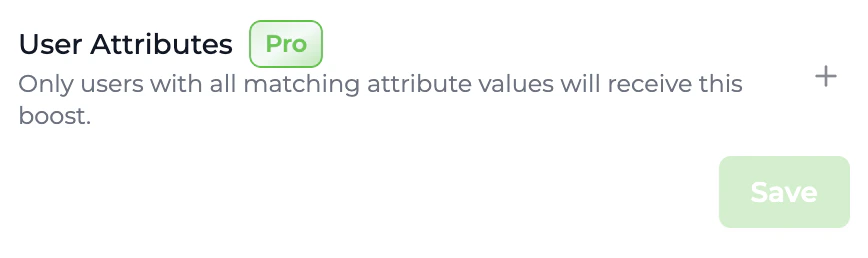 Click *Save Boost* to save your new boost to your account. The boost will be in the inactive state by default. To activate it, click the dropdown to the right of the boost name on the Boosts page and click Activate.
Boost Multipliers
Every boost has a single multiplier value that increases the total points earned by users affected by that boost.
Boost multipliers must be positive numbers, but can be decimals to support scenarios where percentage boosts like '50% more points' may be required.
Boost Stacking
Points boosts in Trophy stack through [multiplication](#boost-multipliers). This is to support allowing users to benefit from multiple boosts simultaneously.
To demonstrate stacking consider a 2X, 1.5X and a 3X boost all active within the same time period. The resulting boost multiplier for a user that qualifies for all three boosts would be as follows:
```txt Boost Stacking Example theme={null}
Overall Multiplier (3 boosts) = 2X * 1.5X * 3X = 9X
```
Boost Rounding
Trophy supports [floating point metric event values](/features/events#event-value), but takes care of rounding points to integers automatically.
However, when using decimal [boost multipliers](#boost-multipliers), there may be some scenarios where this default rounding is not enough to always produce integer points values.
Therefore Trophy offers three rounding modes to provide additional control on rounding behavior specifically when boosts are involved in points calculations.
* **Round Down**: By default, Trophy will round points down to the nearest integer when boost multiplication results in a decimal.
* **Round Up**: Trophy rounds decimal points up to the nearest integer after boost multiplication.
* **Round Nearest**: Trophy will round points to the nearest integer, up or down, based on the final value after boost multiplication. For example `1.2` is rounded to `1` and `1.7` is rounded to `2`.
In scenarios where points are used to mimic platform credit mechanics, it's recommended to use the default rounding down behavior to protect against slippage.
Simply choose your preferred rounding mode when [creating boosts](/features/points#creating-boosts) through the Trophy dashboard.
Points Levels
Points levels are discrete milestones you define on a points system in Trophy.
Each level has a threshold. When a user's total points in the system exceeds this threshold, Trophy assigns them that level automatically. You do not need to maintain level logic in your own codebase.
Use levels for rank tiers, progression UI, reward tiers, or analytics. Trophy keeps each user's current level in sync whenever they earn or lose points in that system.
Configuring levels
To set up levels for a points system, open it from the [points page](https://app.trophy.so/points) in the Trophy dashboard and use the levels tab to add or manage levels.
From the points page, select the points system you want to add levels to.
From your points system page, open the levels tab.
Create each level with a stable key, a display name, optional description, badge image, and the points threshold required to reach that level.
Thresholds should reflect how you want progression to feel as users accumulate points from your triggers.
Save your levels. Trophy will evaluate totals against these thresholds on every points change.
Displaying Levels
Most teams combine three approaches: a static picture of every level (for progression screens), the user’s current level (for headers and profile), and immediate feedback when an action pushes them into a new level.
Displaying All Levels
Call the [get levels API](/api-reference/endpoints/points/get-points-levels) once per points system key (for example on app load or from your server when rendering a progression page).
The response is an array of levels with `key`, `name`, `description`, optional `badgeUrl`, and the `points` threshold for each level. By binding your UI to the Trophy API response, you'll ensure that it automatically updates when you make changes to levels in the Trophy dashboard.
```json Response [expandable] theme={null}
[
{
"id": "1140fe51-6bce-4b44-b0ad-bddc4e123534",
"key": "bronze",
"name": "Bronze",
"description": "Starting level",
"badgeUrl": "https://example.com/bronze.png",
"points": 0
},
{
"id": "2240fe51-6bce-4b44-b0ad-bddc4e123534",
"key": "silver",
"name": "Silver",
"description": "Mid-tier level",
"badgeUrl": null,
"points": 50
},
{
"id": "3340fe51-6bce-4b44-b0ad-bddc4e123534",
"key": "gold",
"name": "Gold",
"description": "Top level",
"badgeUrl": "https://example.com/gold.png",
"points": 200
}
]
```
Displaying User Level
The [user points API](/api-reference/endpoints/users/get-a-users-points) returns the user’s `total`, their current `level` object, and recent `awards`. The `level` field contains the user's current level, or null if no levels exist or they have not reached the points threshold for any level yet.
Pair `total` with the ordered level list from the previous step to draw a progress bar between the current threshold and the next.
```json Response [expandable] theme={null}
{
"id": "0040fe51-6bce-4b44-b0ad-bddc4e123534",
"key": "xp",
"name": "XP",
"description": null,
"badgeUrl": null,
"maxPoints": null,
"total": 100,
"level": {
"id": "1140fe51-6bce-4b44-b0ad-bddc4e123534",
"key": "silver",
"name": "Silver",
"description": "Mid-tier level",
"badgeUrl": null,
"points": 50
},
"awards": [
{
"id": "0040fe51-6bce-4b44-b0ad-bddc4e123534",
"awarded": 10,
"date": "2021-01-01T00:00:00Z",
"total": 100,
"trigger": {
"id": "0040fe51-6bce-4b44-b0ad-bddc4e123534",
"type": "metric",
"points": 10,
"metricName": "Flashcards Flipped",
"metricThreshold": 1000
}
}
]
}
```
Level Change Notifications
When you send a [metric change event](/api-reference/endpoints/metrics/send-a-metric-change-event), the response will include a `points` map keyed by your points system keys for each system that changed as a result of the event.
The data contains a `level` key only when the user’s level changed because of this event. If their level stayed the same, that key is omitted, so you can safely treat a present `level` as a level change signal without extra bookkeeping.
```json Response [expandable] theme={null}
{
...,
"points": {
"xp": {
...,
"level": {
"id": "1140fe51-6bce-4b44-b0ad-bddc4e123534",
"key": "bronze",
"name": "Bronze",
"description": "Starting level",
"badgeUrl": null,
"points": 0
},
...
}
}
}
```
A typical pattern is to check the object for your system after a successful event, then trigger a toast, modal, or sound:
```ts theme={null}
const pts = response.points?.xp; // use your points system key
if (pts?.level) {
// Level changed on this request — e.g. toast, modal, confetti if level up
notifyLevelChange(pts.level.name, pts.total);
}
```
The same `level` behavior applies when points change from an [achievement completion](/api-reference/endpoints/achievements/mark-an-achievement-as-completed).
For server-driven notifications (email, push, CRM) that must not depend on the client seeing the HTTP response, subscribe to the [`points.level_changed`](/webhooks/events/points/points-level-changed) webhook instead.
This webhook fires when a user’s level changes as a result of earning or losing points, and includes `previousLevel` and `newLevel`.
Account-level analytics
The [get level summary API](/api-reference/endpoints/points/get-points-level-summary) returns how many users are currently at each level which is useful for admin dashboards, funnel views, or balancing progression.
```json Response [expandable] theme={null}
[
{
"level": {
"id": "1140fe51-6bce-4b44-b0ad-bddc4e123534",
"key": "bronze",
"name": "Bronze",
"description": "Starting level",
"badgeUrl": "https://example.com/bronze.png",
"points": 0
},
"users": 5012
},
{
"level": {
"id": "2240fe51-6bce-4b44-b0ad-bddc4e123534",
"key": "silver",
"name": "Silver",
"description": "Mid-tier level",
"badgeUrl": null,
"points": 50
},
"users": 1501
},
{
"level": {
"id": "3340fe51-6bce-4b44-b0ad-bddc4e123534",
"key": "gold",
"name": "Gold",
"description": "Top level",
"badgeUrl": "https://example.com/gold.png",
"points": 200
},
"users": 102
}
]
```
Displaying Points
There are a few ways to use Trophy to fetch and display points in your app.
For working examples check out our guides on adding an [XP
feature](/guides/how-to-build-an-xp-feature) or an [energy
feature](/guides/how-to-build-an-energy-feature) to your web or mobile app.
Triggering Transactional UI
Firstly, any points awarded to or deducted from users as a result of a metric change event are returned in the response when using the [metric change event API](/api-reference/endpoints/metrics/send-a-metric-change-event).
The response includes the user's new total points, how many points were awarded or deducted as a result of the event, and the details of the specific points triggers that fired. When [Points Levels](#points-levels) are enabled, each points object in that response may also include **`level`**: Trophy includes the user's **new** level **only when it changed** as a result of that event. The same optional `level` behavior applies when points change from an [achievement completion](/api-reference/endpoints/achievements/mark-an-achievement-as-completed).
Example `POST /metrics/{key}/event` response (fields match the Trophy API spec; your keys under `points` and `leaderboards` depend on your account):
```json Response [expandable] theme={null}
{
"metricId": "d01dcbcb-d51e-4c12-b054-dc811dcdc623",
"eventId": "0040fe51-6bce-4b44-b0ad-bddc4e123534",
"total": 750,
"achievements": [
{
"id": "5100fe51-6bce-6j44-b0hs-bddc4e123682",
"trigger": "metric",
"metricId": "5100fe51-6bce-6j44-b0hs-bddc4e123682",
"metricName": "Flashcards Flipped",
"metricValue": 500,
"name": "500 Flashcards Flipped",
"description": "Write 500 words in the app.",
"achievedAt": "2020-01-01T00:00:00Z"
}
],
"currentStreak": {
"length": 1,
"frequency": "daily",
"started": "2025-04-02",
"periodStart": "2025-03-31",
"periodEnd": "2025-04-05",
"expires": "2025-04-12"
},
"points": {
"xp": {
"id": "0040fe51-6bce-4b44-b0ad-bddc4e123534",
"key": "xp",
"name": "XP",
"description": null,
"badgeUrl": null,
"maxPoints": null,
"total": 10,
"level": {
"id": "1140fe51-6bce-4b44-b0ad-bddc4e123534",
"key": "bronze",
"name": "Bronze",
"description": "Starting level",
"badgeUrl": null,
"points": 0
},
"added": 10,
"awards": [
{
"id": "0040fe51-6bce-4b44-b0ad-bddc4e123534",
"awarded": 10,
"date": "2021-01-01T00:00:00Z",
"total": 10,
"trigger": {
"id": "0040fe51-6bce-4b44-b0ad-bddc4e123534",
"type": "metric",
"metricName": "Flashcards Flipped",
"metricThreshold": 100,
"points": 10
}
}
]
}
},
"leaderboards": {
"daily_champions": {
"id": "0040fe51-6bce-4b44-b0ad-bddc4e123535",
"key": "daily_champions",
"name": "Daily Champions",
"description": null,
"rankBy": "metric",
"runUnit": null,
"runInterval": 0,
"maxParticipants": 100,
"metricName": "Flashcards Flipped",
"metricKey": "flashcards-flipped",
"threshold": 10,
"start": "2025-01-01",
"end": null,
"previousRank": 50,
"rank": 12
}
}
}
```
This makes it really simple to read the response and trigger any of the following transactional UI in your application:
* Displaying in-app notifications and pop-ups
* Playing sound effects
Displaying User's Points
Trophy also has APIs that allow you fetch user's points data whenever you want.
First, the [user points API](/api-reference/endpoints/users/get-a-users-points) returns the user's total points for a particular points system, their current **`level`** (or `null` if levels are not in use or they have not reached a level yet), and up to 100 of the most recent events that awarded points to or deducted points from them.
You can use this API to display the user's total points anywhere in your platform as well as a 'Latest awards' section or similar.
`GET /users/{id}/points/{key}` — example response body (Trophy API spec):
```json Response [expandable] theme={null}
{
"id": "0040fe51-6bce-4b44-b0ad-bddc4e123534",
"key": "xp",
"name": "XP",
"description": null,
"badgeUrl": null,
"maxPoints": null,
"total": 100,
"level": {
"id": "1140fe51-6bce-4b44-b0ad-bddc4e123534",
"key": "silver",
"name": "Silver",
"description": "Mid-tier level",
"badgeUrl": null,
"points": 50
},
"awards": [
{
"id": "0040fe51-6bce-4b44-b0ad-bddc4e123534",
"awarded": 10,
"date": "2021-01-01T00:00:00Z",
"total": 100,
"trigger": {
"id": "0040fe51-6bce-4b44-b0ad-bddc4e123534",
"type": "metric",
"points": 10,
"metricName": "Flashcards Flipped",
"metricThreshold": 1000
}
}
]
}
```
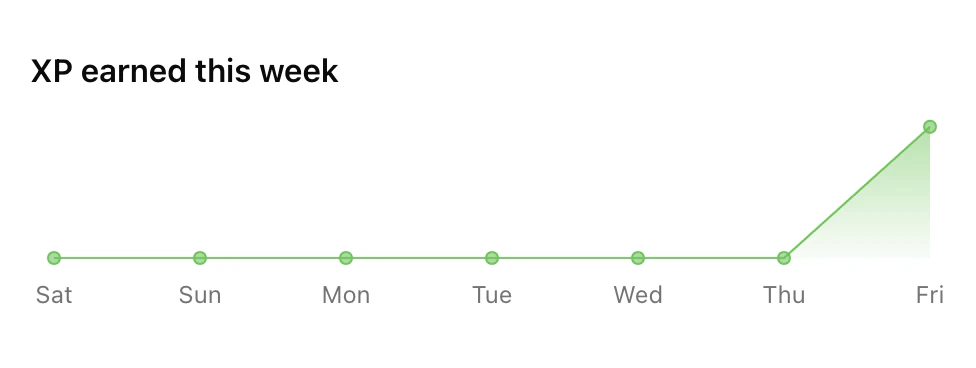
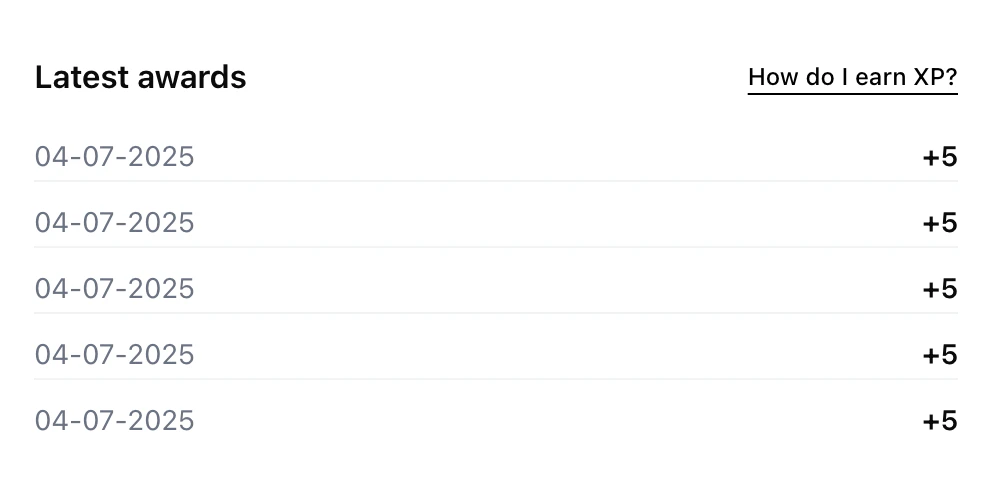 Then, the [user points summary API](/api-reference/endpoints/users/get-a-users-points-summary) can be used to fetch historical points data for a particular user.
Data can be aggregated daily, weekly or monthly between a start and end date. Use this API to display points progress charts to users over any time frame.
Example `GET /users/{id}/points/{key}/event-summary` **200** response (Trophy API spec; shape matches your `aggregation`, `startDate`, and `endDate` query parameters):
```json GET /users/{id}/points/{key}/event-summary — 200 response [expandable] theme={null}
[
{
"date": "2024-01-01",
"total": 100,
"change": 100
},
{
"date": "2024-01-02",
"total": 300,
"change": 200
},
{
"date": "2024-01-03",
"total": 600,
"change": 300
}
]
```
Then, the [user points summary API](/api-reference/endpoints/users/get-a-users-points-summary) can be used to fetch historical points data for a particular user.
Data can be aggregated daily, weekly or monthly between a start and end date. Use this API to display points progress charts to users over any time frame.
Example `GET /users/{id}/points/{key}/event-summary` **200** response (Trophy API spec; shape matches your `aggregation`, `startDate`, and `endDate` query parameters):
```json GET /users/{id}/points/{key}/event-summary — 200 response [expandable] theme={null}
[
{
"date": "2024-01-01",
"total": 100,
"change": 100
},
{
"date": "2024-01-02",
"total": 300,
"change": 200
},
{
"date": "2024-01-03",
"total": 600,
"change": 300
}
]
```
Displaying Aggregate Data
Additionally there are a number of APIs that can be used to fetch and display points data at the account level.
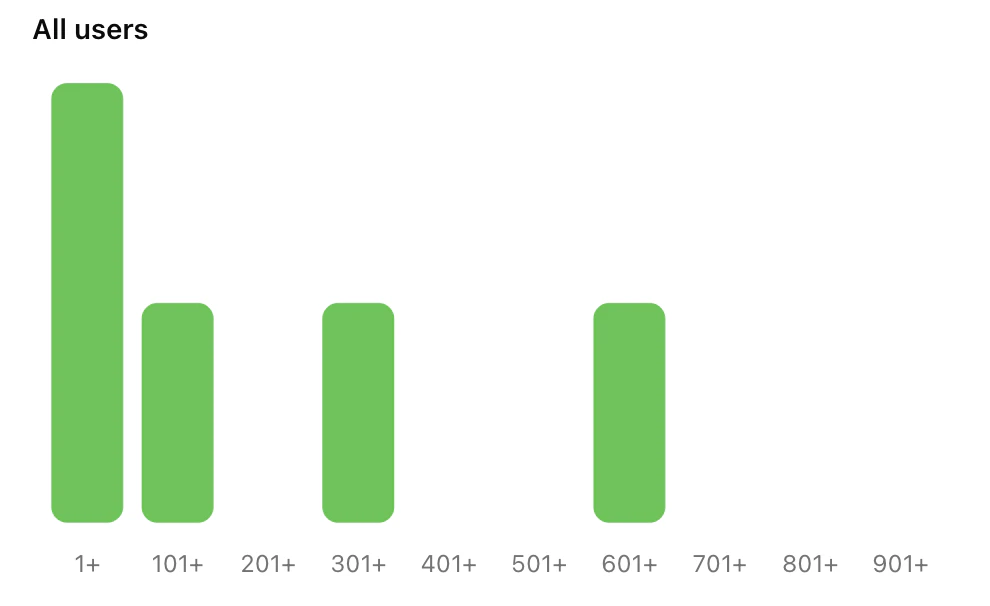
First, the [points summary API](/api-reference/endpoints/points/get-points-summary) returns aggregate points system data across your entire user base.
Use this data to display a histogram of points for a particular points system and show users how they compare to others on the platform. When you use [Points Levels](#points-levels), the [level summary API](/api-reference/endpoints/points/get-points-level-summary) complements this with a per-level user count.
`GET /points/{key}/summary` — example **200** response (Trophy API spec):
```json GET /points/{key}/summary — 200 response [expandable] theme={null}
[
{ "from": 0, "to": 0, "users": 5012 },
{ "from": 1, "to": 100, "users": 1501 },
{ "from": 101, "to": 200, "users": 1007 },
{ "from": 201, "to": 300, "users": 584 },
{ "from": 301, "to": 400, "users": 201 },
{ "from": 401, "to": 500, "users": 102 },
{ "from": 501, "to": 600, "users": 25 },
{ "from": 601, "to": 700, "users": 0 },
{ "from": 701, "to": 800, "users": 0 },
{ "from": 801, "to": 900, "users": 0 },
{ "from": 901, "to": 1000, "users": 0 }
]
```
Finally, the [points system API](/api-reference/endpoints/points/get-points) returns the system metadata and triggers. Example **200** response (Trophy API spec):
```json GET /points/{key} — 200 response [expandable] theme={null}
{
"id": "0040fe51-6bce-4b44-b0ad-bddc4e123534",
"name": "XP System",
"description": "Experience points for user engagement",
"badgeUrl": "https://example.com/badge.png",
"maxPoints": null,
"triggers": [
{
"id": "0040fe51-6bce-4b44-b0ad-bddc4e123534",
"type": "metric",
"points": 10,
"status": "active",
"metricId": "0040fe51-6bce-4b44-b0ad-bddc4e123534",
"metricName": "words written",
"metricThreshold": 1000,
"userAttributes": [
{ "key": "plan-type", "value": "premium" },
{ "key": "region", "value": "us-east" }
],
"eventAttributes": [
{ "key": "source", "value": "mobile-app" },
{ "key": "platform", "value": "ios" }
],
"created": "2021-01-01T00:00:00Z",
"updated": "2021-01-01T00:00:00Z"
},
{
"id": "0040fe51-6bce-4b44-b0ad-bddc4e123536",
"type": "streak",
"points": 10,
"status": "active",
"streakLengthThreshold": 7,
"created": "2021-01-01T00:00:00Z",
"updated": "2021-01-01T00:00:00Z"
},
{
"id": "0040fe51-6bce-4b44-b0ad-bddc4e123535",
"type": "achievement",
"points": 50,
"status": "active",
"achievementId": "0040fe51-6bce-4b44-b0ad-bddc4e123535",
"achievementName": "finish onboarding",
"userAttributes": [{ "key": "plan-type", "value": "premium" }],
"created": "2021-01-01T00:00:00Z",
"updated": "2021-01-01T00:00:00Z"
}
]
}
```
The points summary API can also be filtered to only return data for users with specific
[custom user attributes](/features/users#custom-user-attributes).
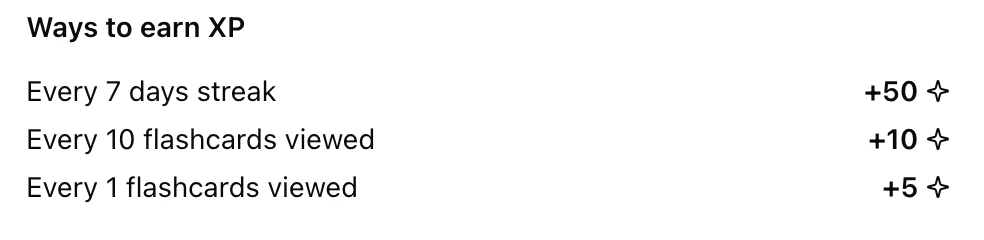
 Use the [points system API](/api-reference/endpoints/points/get-points) response to show users how they can earn points on your platform. Any new triggers you add will automatically be returned from this API, reducing code changes in your platform and shifting operations to Trophy.
Points Analytics
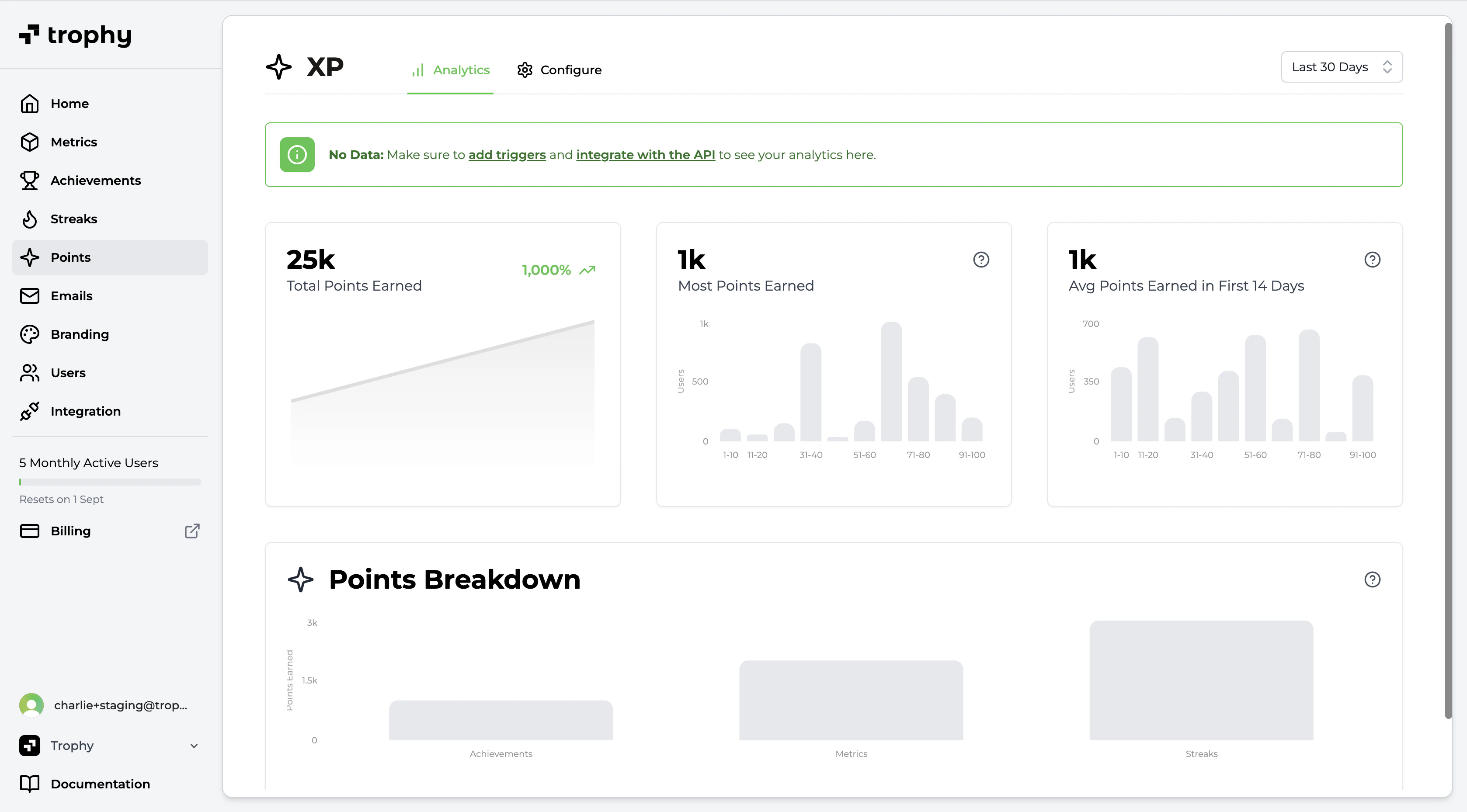
Trophy has built-in analytics to track points awards for each points system you configure across your users in real time including:
* Total points earned by all users over time
* Most points earned by a single user
* Average points earned in the first 14 days (useful for understanding new user retention patterns and the impact of points)
* A breakdown on the most commonly awarded points triggers
Get Support
Want to get in touch with the Trophy team? Reach out to us via [email](mailto:support@trophy.so). We're here to help!