> ## Documentation Index
> Fetch the complete documentation index at: https://docs.trophy.so/llms.txt
> Use this file to discover all available pages before exploring further.
# Leaderboards
> Learn how to use Leaderboards in a gamified product experience with Trophy.
What are Leaderboards?
Leaderboards are social competitions between users of your application. Use leaderboards to increase engagement and foster social interaction.
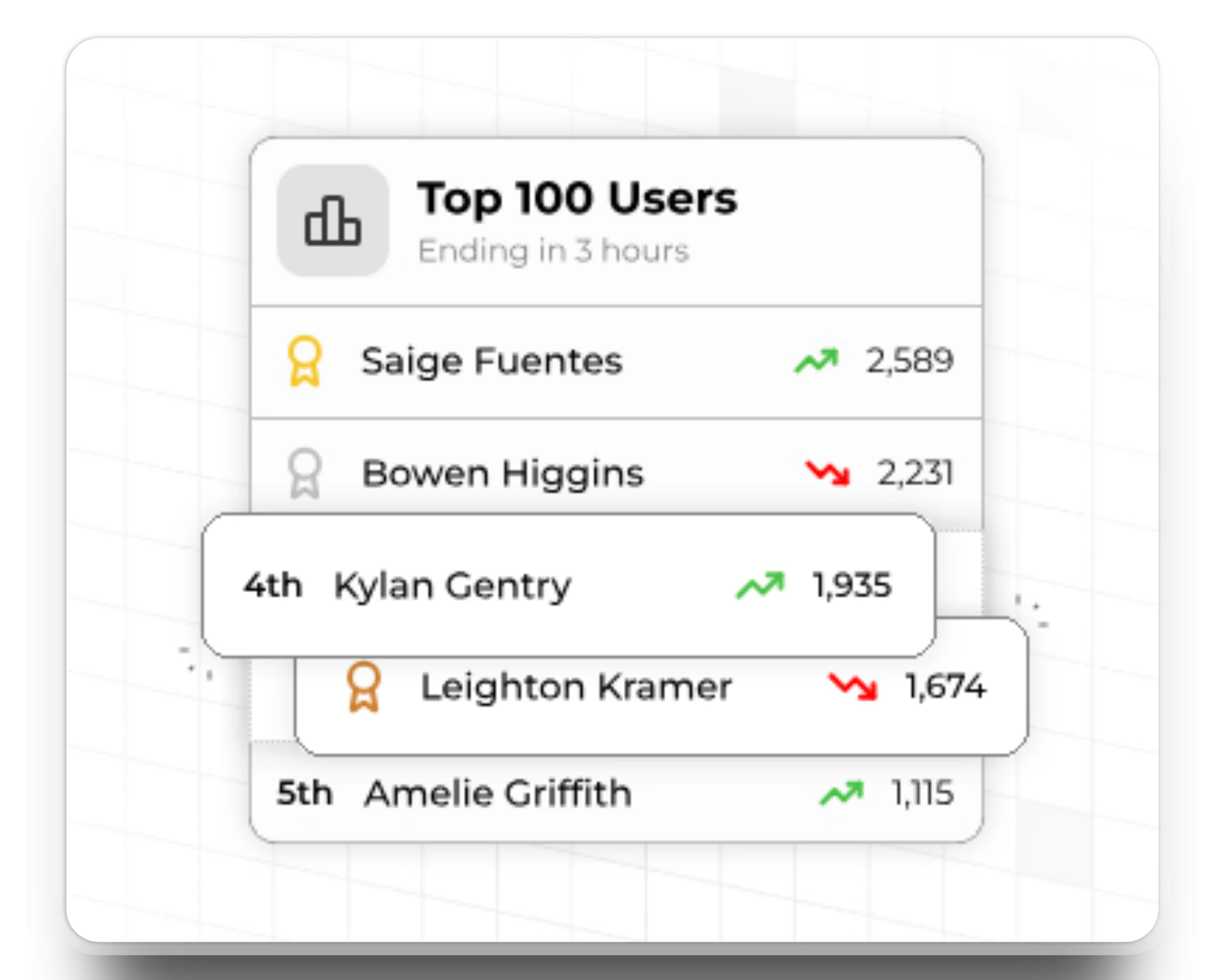
Types of Leaderboards
In this section we outline the different types of leaderboards supported in Trophy and when to use each one.
Perpetual Leaderboards
Perpetual leaderboards never reset. Once started they continually track and rank users progress over time forever, or until the configured [end date](#end-dates).
Use perpetual leaderboards when you want to create all-time rankings of user activity.
Repeating Leaderboards
Repeating leaderboards can be configured to reset after any arbitrary number of days, months or years.
In Trophy each instance of a repeating leaderboard is called a **'run'**. For example, a monthly leaderboard would have 12 runs in a year, but a daily leaderboard would have `n` runs in a month where `n` is the number of days in a given month.
Trophy tracks the rankings in each run of a repeating leaderboard individually and provides [APIs](/api-reference/endpoints/leaderboards/get-leaderboard) to fetch ranking data on historical runs.
We recommend using repeating leaderboards over perpetual where possible as
repeating leaderboards give new users an equal chance to compete with existing
users, helping to prevent leaderboards from becoming stale.
Handling Time Zones
If you have tracked users' [time zones](/features/users#param-tz) with Trophy, these will be used to ensure that each user has an equal chance of winning no matter where they are in the world.
In practice this means leaderboards are finalized and winners chosen about 12 hours after they naturally finish in UTC to allow users in all time zones to make their final push.
Tips for Weekly Leaderboards
To create a weekly leaderboard, set up a [repeating leaderboard](#repeating-leaderboards) on a 7 day schedule and set the start date to be the next occurring first day of the week.
While you wait for the start date to come around, the leaderboard will be in `scheduled` status and will automatically go live on the start date.
Ranking Logic
Leaderboards in Trophy are configurable to rank participants in a number of different ways to support common use cases.
Ranking Methods
The ranking method of a leaderboard determines on what dimension participants will be ordered.

Metric Rankings
Metric leaderboards are linked to an existing Trophy [Metric](/features/metrics) and rank users based on their total metric value.
Use metric leaderboards if you only want to rank users based on a single interaction.
Points Rankings
Points leaderboards are linked to an existing Trophy [Points System](/features/points) and automatically rank users according to their total points.
Use a points leaderboard if you want to rank users based on a combination of metrics, achievements or other Trophy features.
Streak Rankings
Streak leaderboards rank users based on their current streak length.
Streak leaderboards can only be [perpetual](#perpetual-leaderboards).
Ranking Breakdowns
If you have a large user base, it's best practice to split up leaderboard participants into smaller, more socially-connected groups. This often leads to higher engagement than when using global leaderboards.
Leaderboards in Trophy can be configured to group users into smaller groups according to one or more [custom user attributes](/features/users#custom-user-attributes).
When using leaderboard breakdowns, [participant limits](#participant-limits)
apply at the group level, not overall.
To set up a leaderboard breakdown, head to the leaderboard configuration page and create or select one or more user attributes in the 'Breakdown Attributes' field.
Trophy will automatically start grouping users into smaller leaderboards based on the values of your chosen attributes for each user.
To fetch rankings for a particular group of users with a specific attribute value, use the [leaderboard rankings API](/api-reference/endpoints/leaderboards/get-leaderboard), specifying one attribute filter in the `userAttributes` parameter as follows:
```bash cURL theme={null}
curl --request GET \
--url https://api.trophy.so/v1/leaderboards/{key}?userAttributes=city:london \
--header 'X-API-KEY: '
```
```typescript Node theme={null}
trophy.leaderboards.get("daily_champions", {
offset: 0,
limit: 10,
run: "2025-01-15",
userAttributes: "city:london"
});
```
```python Python theme={null}
client.leaderboards.get(
key="daily_champions",
offset=0,
limit=10,
run="2025-01-15",
user_attributes="city:london"
)
```
```php PHP theme={null}
$request = new LeaderboardsGetRequest([
'offset' => 0,
'limit' => 10,
'run' => "2025-01-15",
'user_attributes' => "city:london"
]);
$trophy->leaderboards->get("daily_champions", $request);
```
```java Java theme={null}
LeaderboardsGetRequest request = LeaderboardsGetRequest.builder()
.offset(0)
.limit(10)
.run("2025-01-15")
.userAttributes("city:london")
.build();
LeaderboardsGetResponse response = client.leaderboards().get("daily_champions", request);
```
```go Go theme={null}
response, err := client.Leaderboards.Get(
"daily_champions",
&api.LeaderboardsGetRequest{
Offset: 0,
Limit: 10,
Run: "2025-01-15",
UserAttributes: "city:london",
},
)
```
```csharp C# theme={null}
var request = new LeaderboardsGetRequest {
Offset = 0,
Limit = 10,
Run = "2025-01-15",
UserAttributes = "city:london"
};
await trophy.Leaderboards.GetAsync("daily_champions", request);
```
```ruby Ruby theme={null}
result = client.Leaderboards.Get(
:key => "daily_champions",
:offset => 0,
:limit => 10,
:run => "2025-01-15",
:user_attributes => "city:london"
)
```
To fetch rankings for a particular group of users with a specific combination of user attributes, pass multiple comma-delimited `key:value` filters in `userAttributes` as follows:
```bash cURL theme={null}
curl --request GET \
--url https://api.trophy.so/v1/leaderboards/{key}?userAttributes=region:southeast,city:london \
--header 'X-API-KEY: '
```
```typescript Node theme={null}
trophy.leaderboards.get("daily_champions", {
offset: 0,
limit: 10,
run: "2025-01-15",
userAttributes: "region:southeast,city:london"
});
```
```python Python theme={null}
client.leaderboards.get(
key="daily_champions",
offset=0,
limit=10,
run="2025-01-15",
user_attributes="region:southeast,city:london"
)
```
```php PHP theme={null}
$request = new LeaderboardsGetRequest([
'offset' => 0,
'limit' => 10,
'run' => "2025-01-15",
'user_attributes' => "region:southeast,city:london"
]);
$trophy->leaderboards->get("daily_champions", $request);
```
```java Java theme={null}
LeaderboardsGetRequest request = LeaderboardsGetRequest.builder()
.offset(0)
.limit(10)
.run("2025-01-15")
.userAttributes("region:southeast,city:london")
.build();
LeaderboardsGetResponse response = client.leaderboards().get("daily_champions", request);
```
```go Go theme={null}
response, err := client.Leaderboards.Get(
"daily_champions",
&api.LeaderboardsGetRequest{
Offset: 0,
Limit: 10,
Run: "2025-01-15",
UserAttributes: "region:southeast,city:london",
},
)
```
```csharp C# theme={null}
var request = new LeaderboardsGetRequest {
Offset = 0,
Limit = 10,
Run = "2025-01-15",
UserAttributes = "region:southeast,city:london"
};
await trophy.Leaderboards.GetAsync("daily_champions", request);
```
```ruby Ruby theme={null}
result = client.Leaderboards.Get(
:key => "daily_champions",
:offset => 0,
:limit => 10,
:run => "2025-01-15",
:user_attributes => "region:southeast,city:london"
)
```
When multiple `userAttributes` filters are provided, all filters must match
for a user to be included in the returned rankings.
Start & End Dates
Use start and end dates to control the window within which leaderboards are actively ranking users.

Start Dates
Leaderboards in Trophy can be set to start at a future date of your choice. This is often useful to allow some time for last minute changes or adjustments before leaderboards start ranking users.
Leaderboards with a start date in the future are scheduled and automatically go live on the start date you choose.
End Dates
Leaderboards in Trophy can have end dates. If you set an end date on a leaderboard then after that date it will enter `finished` status and rankings will be finalized and winners chosen.
Due to differences in [time zones](#handling-time-zones), leaderboards can be
finalized up to 12 hours after the end date in UTC to allow all users to reach
the end date according to their local clock.
Participant Limits
Leaderboards in Trophy have a maximum number of participants of **1,000**. However a leaderboard can be configured to have any arbitrary number of participants to support use cases like *Top 100* or similar.
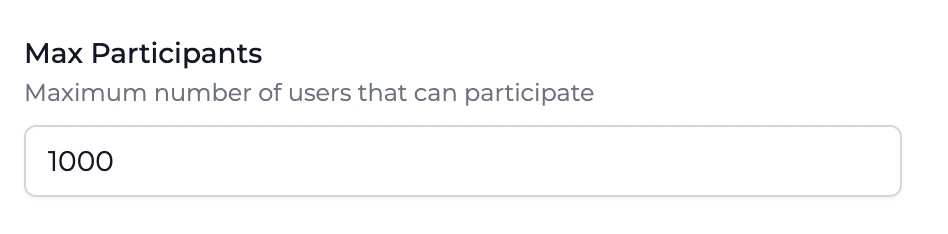 If a leaderboard already has a number of participants that matches its configured maximum, new users will have to surpass the score of the lowest rank to join the leaderboard.
We chose to limit leaderboard size to help guide customers on best practice.
Traditionally, leaderboards with lots of participants fail to engage users beyond the top 1%, and have a **negative** impact on users in the bottom half, particularly new users. To avoid this, keep your leaderboards small by breaking them down into smaller leaderboards using [breakdown attributes](#ranking-breakdowns).
For more background on the negative effects on global leaderboards, read this [blog post](https://www.trophy.so/blog/leaderboard-only-motivating-top-one-percent).
The only exception to this is when using [breakdown attributes](#ranking-breakdowns) to group participants into smaller cohorts. When using breakdown attributes the participant limit applies to each group, not overall.
If a leaderboard already has a number of participants that matches its configured maximum, new users will have to surpass the score of the lowest rank to join the leaderboard.
We chose to limit leaderboard size to help guide customers on best practice.
Traditionally, leaderboards with lots of participants fail to engage users beyond the top 1%, and have a **negative** impact on users in the bottom half, particularly new users. To avoid this, keep your leaderboards small by breaking them down into smaller leaderboards using [breakdown attributes](#ranking-breakdowns).
For more background on the negative effects on global leaderboards, read this [blog post](https://www.trophy.so/blog/leaderboard-only-motivating-top-one-percent).
The only exception to this is when using [breakdown attributes](#ranking-breakdowns) to group participants into smaller cohorts. When using breakdown attributes the participant limit applies to each group, not overall.
Creating Leaderboards
To create a leaderboard, head to the [leaderboards page](https://app.trophy.so/leaderboards) in the Trophy dashboard and hit the *New Leaderboard* button.
Choose a name for the leaderboard.
Enter a unique reference key for the leaderboard. This is what you'll use to reference the leaderboard in your application code.
Choose one of the [methods](#ranking-methods) that the leaderboard will rank users by:
* **Metric**: Ranks users by total value of a chosen metric
* **Points**: Ranks users by total points in a chosen points system
* **Streak**: Ranks users by current streak length
Choose the maximum number of participants the leaderboard should support. The
current upper limit supported by Trophy is 1,000. Read [this
section](#participant-limits) to learn more about how we chose this limit.
Hit save and head to the configure page to set up [start & end dates](#start-end-dates), [repeating leaderboard schedules](#repeating-leaderboards) and more.
Managing Leaderboards
Leaderboards in Trophy have a number of statuses to help you control when users and how users can join them.
Leaderboard Statuses
Leaderboards can have one of the following statuses:
* `Inactive`
* `Scheduled`
* `Active`
* `Finished`
All new leaderboards are created as `Inactive`. While inactive, any properties or settings of the leaderboard can be changed, they won't be visible to users and users can't join them.
Once you're ready for users to start participating, you can make it `Active`. This means Trophy will start tracking users' activity and entering them into leaderboards.
Leaderboards that have been configured with a [start date](#start-dates) in the future can't be made active, they can only be `Scheduled`. Once the start date is past, Trophy will automatically make them `Active` and start accepting participants.
If a leaderboard has an [end date](#end-dates), then once it has past Trophy will automatically move it to `Finished` status and stop monitoring user activity. Once a leaderboard has finished it won't be visible to users but you can still query APIs to get rankings for historical runs.
Displaying Leaderboards
Check out our [full guide](/guides/how-to-build-a-leaderboards-feature) on
adding leaderboards to your app for more details.
Leaderboard Analytics
Trophy has built-in analytics to help you understand how users are engaging with your leaderboards.
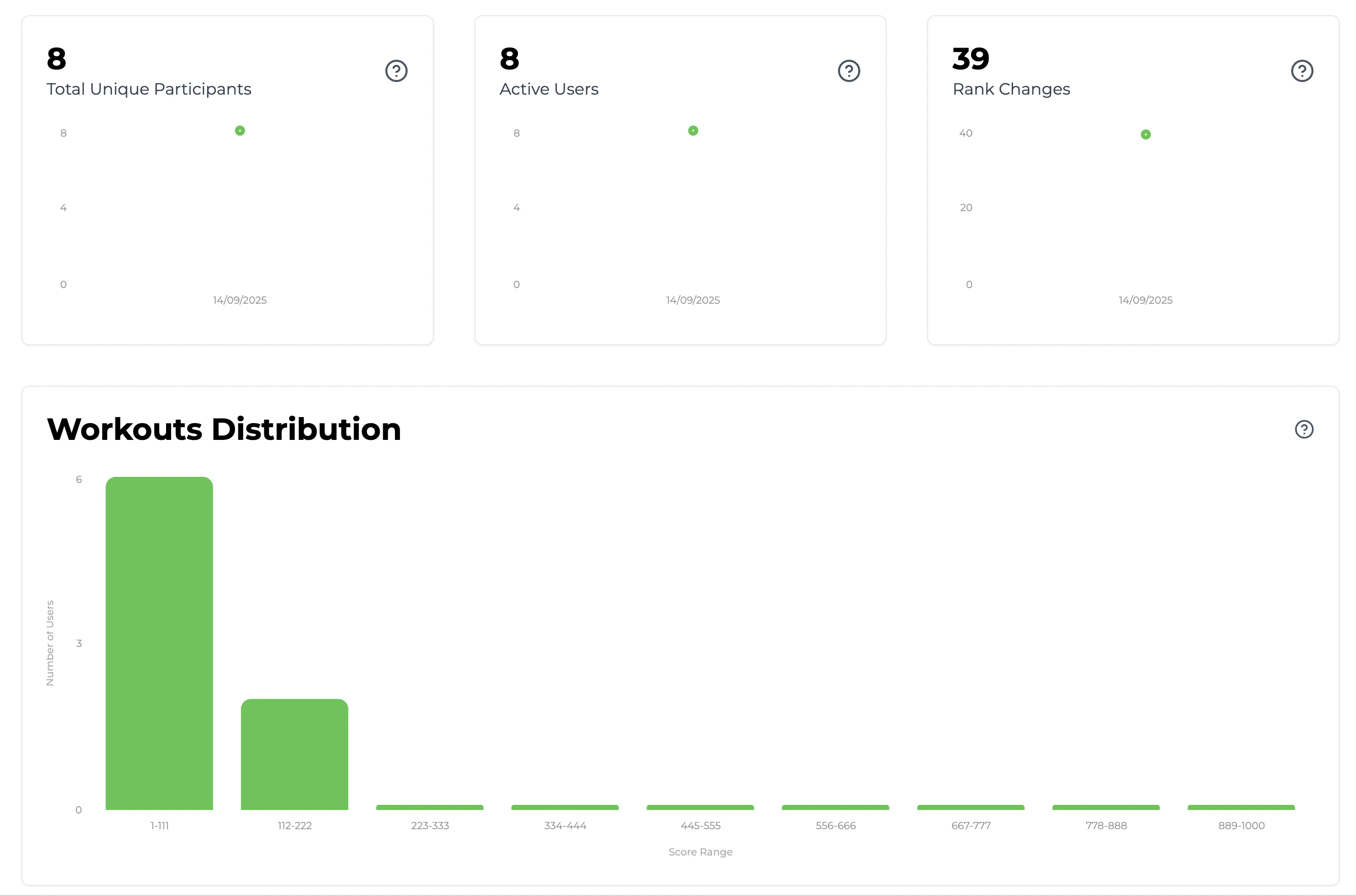
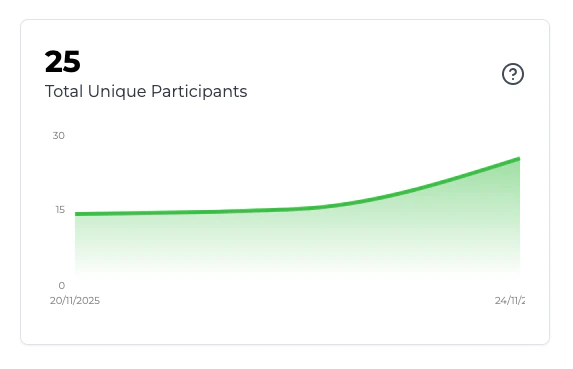
Total Unique Participants
This chart shows how many unique users have participated in any run of a leaderboard over time. This is useful to understand how many of your users actually take part in leaderboards and how [participant limits](#participant-limits) are affecting this.
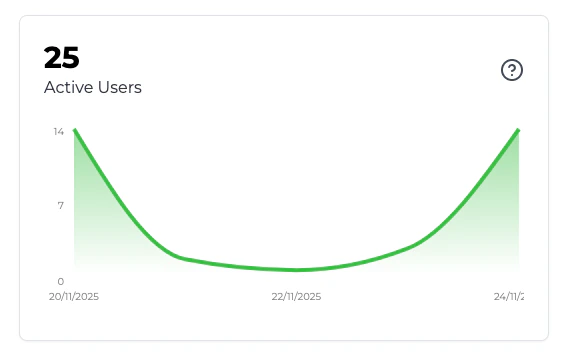
Active Users
This chart show the number of users who have changed rank at least once in a given leaderboard. This is useful to get a sense of how competitive the average user is in a particular leaderboard.
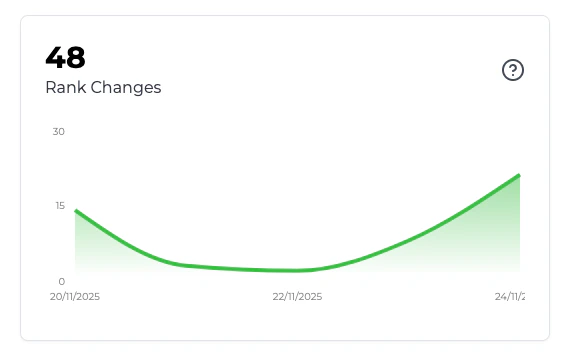
Rank Changes
This chart shows the total number of rank changes in a particular leaderboard over time. This is useful to understand how competitive users are across the board.
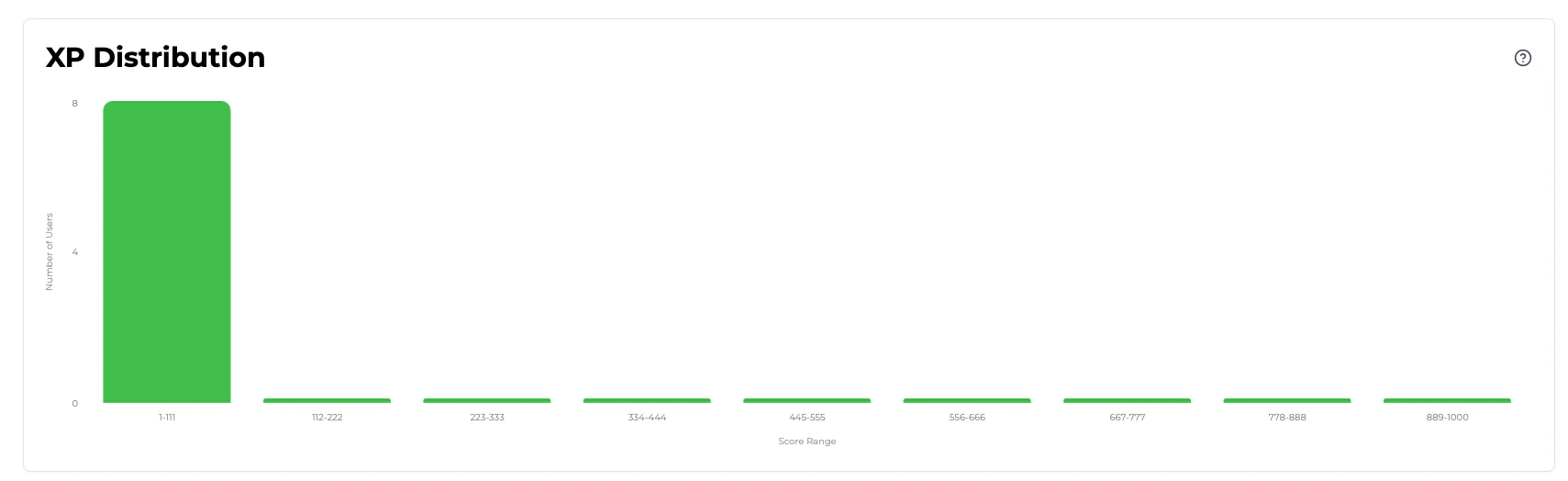
Score Distribution
This chart is a histogram of users' scores in a particular leaderboard. This is useful to get a sense of how bunched up or spread out users are, and what sections of the rankings are the most competitive.
Frequently Asked Questions
We limit leaderboards to 1,000 participants.
Read more about this in the [dedicated section](#participant-limits) of this page.
{" "}
Trophy supports running repeating leaderboards on any arbitrary number of
days. So a weekly leaderboard would just be a leaderboard that repeats every 7
days. Read [this section](#tips-for-weekly-leaderboards) for more tips of
creating weekly leaderboards.
Get Support
Want to get in touch with the Trophy team? Reach out to us via [email](mailto:support@trophy.so). We're here to help!