> ## Documentation Index
> Fetch the complete documentation index at: https://docs.trophy.so/llms.txt
> Use this file to discover all available pages before exploring further.
# Cómo Crear un Rastreador de Fitness Gamificado
> Aprende a crear una aplicación de fitness similar a Strava con Next.js, que incluye seguimiento multideporte, clasificaciones basadas en ciudades y progresión de XP normalizada.
En este tutorial, crearemos **TrophyFitness**, una aplicación de fitness para consumidores que rastrea carrera, ciclismo y natación. Implementaremos un bucle de gamificación completo que incluye clasificaciones semanales, rachas formadoras de hábitos y un sistema de progresión por niveles.
Si quieres ir directamente al código, consulta el [repositorio de ejemplo](https://github.com/trophyso/example-fitness-platform) o la [demostración en vivo](https://fitness.examples.trophy.so).
Tabla de Contenidos
* [Stack Tecnológico](#tech-stack)
* [Requisitos Previos](#prerequisites)
* [Configuración e Instalación](#setup-installation)
* [Diseñar el Modelo de Datos](#designing-the-data-model)
* [Cómo Funciona Trophy](#how-trophy-works)
* [Configurar Trophy](#setting-up-trophy)
* [Acciones del Servidor](#server-actions)
* [El Sistema de Niveles](#the-leveling-system)
* [Crear el Panel de Control](#building-the-dashboard)
* [Registrar Entrenamientos](#logging-workouts)
* [Implementar Clasificaciones](#implementing-leaderboards)
* [Crear la Página de Logros](#building-the-achievements-page)
* [Crear la Página de Perfil](#building-the-profile-page)
* [El Resultado](#the-result)
* Una cuenta de Trophy (regístrate [aquí](https://app.trophy.so/sign-up)).
* Node.js 18+ instalado.
Configuración e Instalación
Primero, clona el repositorio inicial o crea una nueva aplicación Next.js:
```bash theme={null}
npx create-next-app@latest trophy-fitness
```
Instala las dependencias necesarias:
```bash theme={null}
npm install @trophyso/node lucide-react clsx tailwind-merge
```
Configura tus variables de entorno en `.env.local`:
```bash theme={null}
TROPHY_API_KEY=your_api_key_here
```
Diseñar el Modelo de Datos
Para una aplicación de fitness multideporte, necesitamos normalizar los esfuerzos. Un ciclo de 10 km no es lo mismo que una carrera de 10 km. Utilizaremos tres métricas distintas para rastrear datos sin procesar y un sistema de XP unificado para la progresión.
1. Las Métricas
Rastrearemos la distancia como el valor principal.
* `distance_run` (km) - con atributo `pace` (caminar/correr).
* `distance_cycled` (km)
* `distance_swum` (m) - con atributo `style` (estilo libre/braza).
2. Los Atributos
Para habilitar clasificaciones locales, etiquetaremos a cada usuario con un atributo `city`.
Cómo Funciona Trophy
Antes de profundizar en el código, entendamos cómo Trophy impulsa nuestra capa de gamificación. En Trophy, las [Métricas](/es/features/metrics) representan diferentes interacciones que los usuarios pueden realizar e impulsan funciones como [Logros](/es/features/achievements), [Rachas](/es/features/streaks) y [Correos Electrónicos](/es/features/emails).
```mermaid theme={null}
flowchart TD
A@{ shape: rounded, label: "Events" }
B@{ shape: rounded, label: "Metrics" }
C@{ shape: rounded, label: "Achievements" }
D@{ shape: rounded, label: "Streaks" }
E@{ shape: rounded, label: "Leaderboards" }
F@{ shape: rounded, label: "Points" }
G@{ shape: rounded, label: "Emails" }
A-.->B
B-->C
B-->D
B-->E
B-->F
B-->G
```
Cuando se registran eventos para un usuario específico, cualquier logro vinculado a la métrica especificada se desbloqueará si se cumplen los requisitos, las rachas se calcularán automáticamente, las clasificaciones se actualizarán y cualquier correo electrónico configurado se programará.
Esto es lo que hace que construir experiencias gamificadas con Trophy sea tan poderoso: hace todo el trabajo detrás de escena.
Configuración de Trophy
Así es como configuraremos Trophy para nuestra aplicación de fitness:
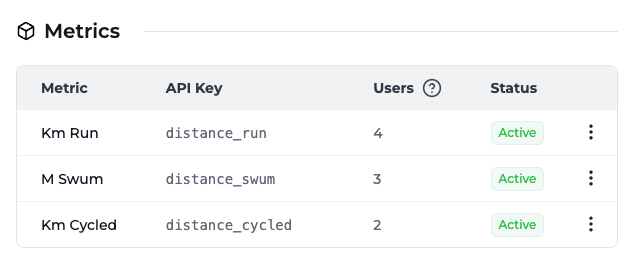
Dirígete a la [página de métricas](https://app.trophy.so/metrics) de Trophy y crea tres métricas:
* `distance_run` — Total de kilómetros corridos
* `distance_cycled` — Total de kilómetros en bicicleta
* `distance_swum` — Total de metros nadados
Estas claves son las que referenciaremos en nuestro código al enviar eventos.
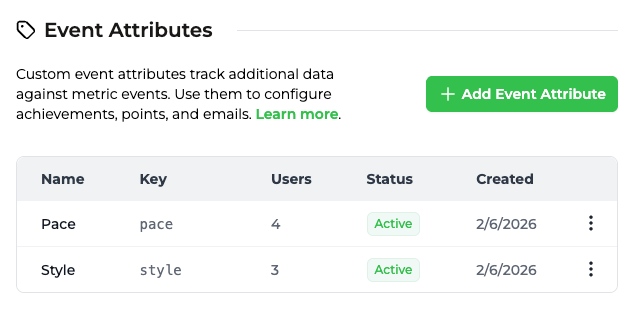
Mientras aún estás en la [página de métricas](https://app.trophy.so/metrics), configura
los atributos de evento **pace** y **style**:
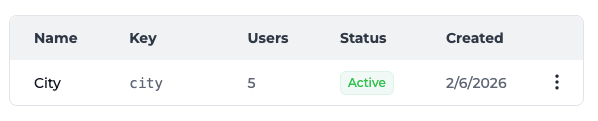
Luego, ve a la [página de atributos de usuario](https://app.trophy.so/users/attributes)
y crea el atributo de usuario **city**:
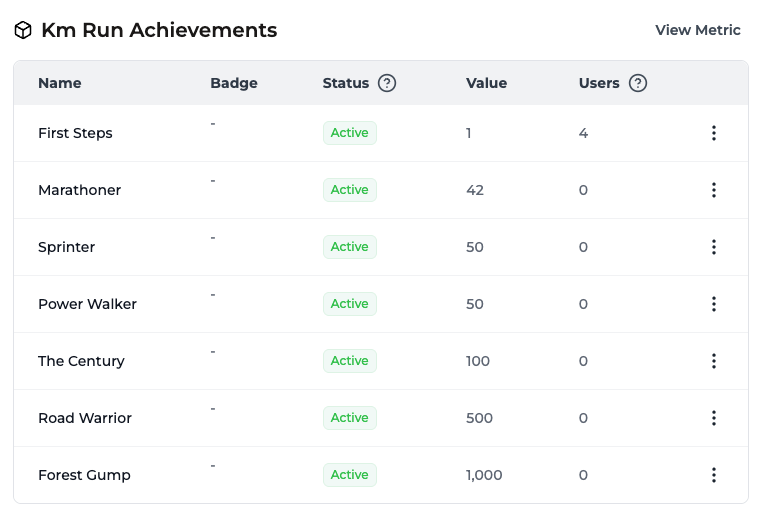
Ve a la [página de logros](https://app.trophy.so/achievements) de Trophy
y crea logros de hitos para cada deporte. Por ejemplo:
**Running:**
* First 5K (5km en total)
* Half Marathon Hero (21.1km en total)
* Marathon Master (42.2km en total)
**Cycling:**
* Century Rider (100km en total)
* Tour Stage (200km en total)
**Swimming:**
* Pool Regular (1000m en total)
* Open Water Ready (5000m en total)
Vincula cada logro a la métrica correspondiente.
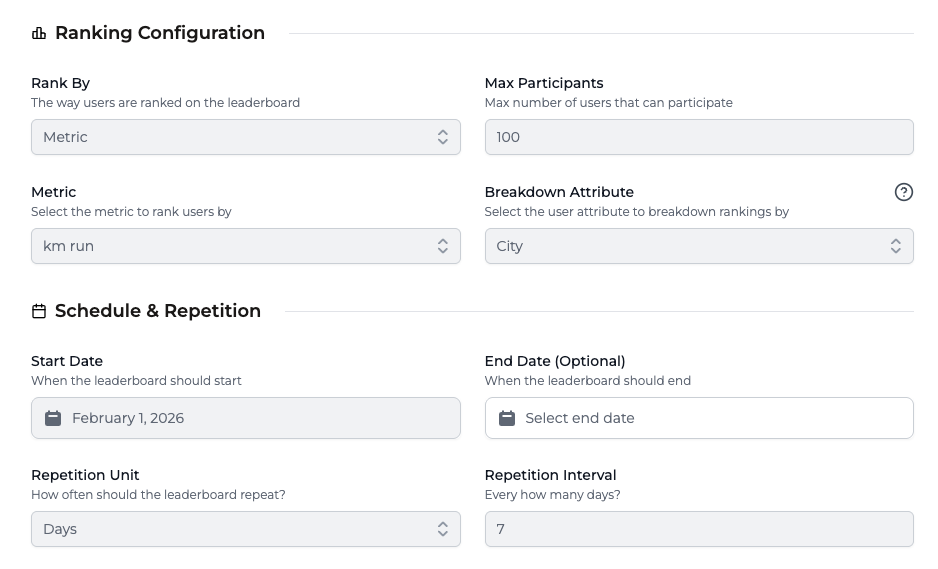
Ve a la [página de clasificaciones](https://app.trophy.so/leaderboards) y configura
clasificaciones semanales para impulsar la competencia. Cada clasificación debe configurarse
con **Unidad de repetición: Días** e **Intervalo de repetición: 7** para
repetirse semanalmente.
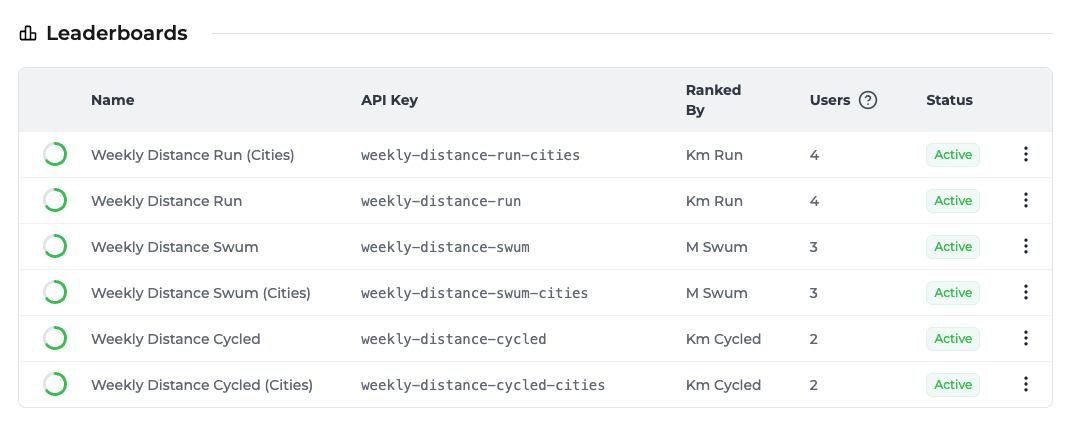
**Clasificaciones globales:**
* `weekly-distance-run`
* `weekly-distance-cycled`
* `weekly-distance-swum`
**Clasificaciones por ciudad** (desglose por atributo de usuario **city**):
* `weekly-distance-run-cities`
* `weekly-distance-cycled-cities`
* `weekly-distance-swum-cities`
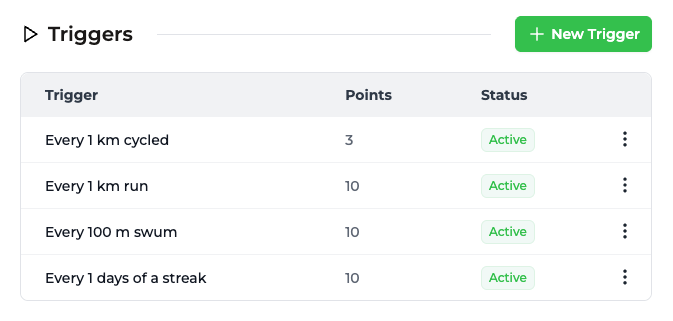
Ve a la [página de puntos](https://app.trophy.so/points) y crea un sistema de puntos
llamado `xp` que otorgue puntos según la actividad:
* Running: 10 XP por km
* Cycling: 3 XP por km
* Swimming: 10 XP por cada 100m
Este enfoque normalizado garantiza una progresión justa entre deportes.
Luego configura **[Niveles de puntos](/es/features/points#points-levels)** en el mismo sistema `xp` para que Trophy pueda rastrear el nivel de cada usuario. Usa las claves y umbrales a continuación para que el código de esta guía coincida con tu panel:
| Nombre | Clave | Umbral de puntos | |
| ------- | --------- | ---------------- | - |
| Rookie | `rookie` | 0 | |
| Active | `active` | 100 | |
| Mover | `mover` | 500 | |
| Athlete | `athlete` | 2500 | |
| Pro | `pro` | 10000 | |
Dirígete a la [página de rachas](https://app.trophy.so/streaks) y configura una
racha diaria vinculada a cualquiera de las métricas de distancia. Los usuarios mantendrán su
racha registrando al menos una actividad por día.
Dirígete a la [página de correos electrónicos](https://app.trophy.so/emails) y añade y activa plantillas para estos correos electrónicos automatizados de participación:
* **Logro desbloqueado** — Celebra nuevas insignias
* **Racha en riesgo** — Recuerda a los usuarios antes de que pierdan su racha
* **Resumen semanal** — Resumen del progreso y posición en la clasificación
Cada tipo de correo tiene su propia sección—añade una plantilla en cada una y actívala para comenzar a enviar. Configura tu marca en la [página de marca](https://app.trophy.so/branding) para correos electrónicos profesionales.
Acciones del Servidor
Crearemos un archivo `src/app/actions.ts` para manejar todas las interacciones con la API de Trophy. Esto mantiene nuestras claves API seguras y nos permite aprovechar las Server Actions de Next.js.
```tsx src/app/actions.ts [expandable] theme={null}
"use server";
import { TrophyApiClient, TrophyApi } from "@trophyso/node";
import { revalidatePath } from "next/cache";
const trophy = new TrophyApiClient({
apiKey: process.env.TROPHY_API_KEY as string,
});
export async function identifyUser(userId: string, name?: string, tz?: string) {
try {
const user = await trophy.users.identify(userId, { name, tz });
return { success: true, user };
} catch (error) {
return { success: false, error: "Failed to identify user" };
}
}
export async function updateUserCity(userId: string, city: string) {
try {
await trophy.users.update(userId, { attributes: { city } });
revalidatePath("/leaderboards");
revalidatePath("/profile");
return { success: true };
} catch (error) {
return { success: false, error: "Failed to update city" };
}
}
export async function getUserStats(userId: string) {
try {
// Fetch all user data in parallel
const [streak, achievements, metrics, pointsResponse, pointsLevels] =
await Promise.all([
trophy.users.streak(userId).catch(() => null),
trophy.users
.achievements(userId, { includeIncomplete: "true" })
.catch(() => []),
trophy.users.allMetrics(userId).catch(() => []),
trophy.users.points(userId, "xp").catch(() => null),
trophy.points.levels("xp").catch(() => []),
]);
return {
streak,
achievements,
points: pointsResponse,
pointsLevels,
metrics,
};
} catch (error) {
console.error("Failed to fetch user stats:", error);
return null;
}
}
export async function logActivity(params: {
type: "run" | "cycle" | "swim";
distance: number;
userId: string;
city?: string;
pace?: string;
style?: string;
}) {
const { type, distance, userId, city, pace, style } = params;
let metricKey = "";
const eventAttributes: Record = {};
switch (type) {
case "run":
metricKey = "distance_run";
if (pace) eventAttributes.pace = pace;
break;
case "cycle":
metricKey = "distance_cycled";
break;
case "swim":
metricKey = "distance_swum";
if (style) eventAttributes.style = style;
break;
}
try {
// Log the event
const response = await trophy.metrics.event(metricKey, {
user: {
id: userId,
...(city ? { attributes: { city } } : {}),
},
value: distance,
...(Object.keys(eventAttributes).length > 0
? { attributes: eventAttributes }
: {}),
});
revalidatePath("/");
revalidatePath("/leaderboards");
revalidatePath("/profile");
return { success: true, data: response };
} catch (error) {
console.error("Failed to log activity:", error);
return { success: false, error: "Failed to log activity" };
}
}
export async function getLeaderboard(leaderboardKey: string, city?: string) {
try {
const response = await trophy.leaderboards.get(leaderboardKey, {
userAttributes: city ? `city:${city}` : undefined,
});
return response.rankings || [];
} catch (error) {
return [];
}
}
export async function getRecentActivities(userId: string) {
// Fetch daily summaries for the last 30 days
const endDate = new Date().toISOString().split("T")[0];
const startDate = new Date(Date.now() - 30 * 24 * 60 * 60 * 1000)
.toISOString()
.split("T")[0];
const metrics = [
{ key: "distance_run", type: "run", unit: "km" },
{ key: "distance_cycled", type: "cycle", unit: "km" },
{ key: "distance_swum", type: "swim", unit: "m" },
];
try {
const summaries = await Promise.all(
metrics.map(async (metric) => {
try {
const data = await trophy.users.metricEventSummary(
userId,
metric.key,
{
aggregation: "daily",
startDate,
endDate,
},
);
return data
.filter((item) => item.change > 0)
.map((item) => ({
id: `${metric.key}-${item.date}`,
type: metric.type,
value: item.change,
unit: metric.unit,
date: item.date,
}));
} catch {
return [];
}
}),
);
return summaries
.flat()
.sort((a, b) => new Date(b.date).getTime() - new Date(a.date).getTime())
.slice(0, 5);
} catch {
return [];
}
}
// Helper to get User ID from cookies
export async function getUserIdFromCookies() {
const { cookies } = await import("next/headers");
const cookieStore = await cookies();
return cookieStore.get("trophy-fitness-user-id")?.value ?? null;
}
```
El Sistema de Niveles
Trophy almacena el nivel de cada usuario en el sistema de puntos `xp` cuando configuras [Niveles de Puntos](/es/features/points#points-levels). La carga útil de [puntos de usuario](/es/api-reference/endpoints/users/get-a-users-points) incluye un objeto `level`. La [API de lista de niveles](/es/api-reference/endpoints/points/get-points-levels) devuelve cada nivel y umbral para que puedas mostrar el progreso hacia el siguiente.
Añade un pequeño ayudante junto a las constantes de tu aplicación en `src/lib/constants.ts`:
```tsx src/lib/constants.ts theme={null}
export type ActivityType = "run" | "cycle" | "swim";
/** Shape of a level from Trophy (`GET /points/{key}/levels`). */
export type TrophyPointsLevel = {
id: string;
key: string;
name: string;
description: string | null;
badgeUrl: string | null;
points: number;
};
/**
* Derive progress from Trophy totals + levels. Prefer `currentLevel` from the user
* points API when present; otherwise infer from `total` and threshold order.
*/
export function getLevelProgress(
total: number,
levels: TrophyPointsLevel[],
currentLevel: TrophyPointsLevel | null | undefined,
) {
const sorted = [...levels].sort((a, b) => a.points - b.points);
if (sorted.length === 0) {
return {
currentLevel: null as TrophyPointsLevel | null,
tierNumber: null as number | null,
nextLevel: null as TrophyPointsLevel | null,
progressToNextLevel: 0,
xpToNext: null as number | null,
};
}
let current = currentLevel ?? null;
if (!current) {
for (let i = sorted.length - 1; i >= 0; i--) {
if (total >= sorted[i].points) {
current = sorted[i];
break;
}
}
}
const idx = current != null ? sorted.findIndex((l) => l.key === current.key) : -1;
const tierNumber = idx >= 0 ? idx + 1 : null;
const nextLevel =
idx >= 0 && idx < sorted.length - 1 ? sorted[idx + 1] : null;
let progressToNextLevel = 100;
let xpToNext: number | null = null;
if (nextLevel != null && current != null) {
const span = nextLevel.points - current.points;
const into = total - current.points;
progressToNextLevel =
span > 0 ? Math.min(100, Math.max(0, (into / span) * 100)) : 100;
xpToNext = Math.max(0, nextLevel.points - total);
} else if (nextLevel != null && current == null) {
const span = nextLevel.points;
progressToNextLevel =
span > 0 ? Math.min(100, Math.max(0, (total / span) * 100)) : 0;
xpToNext = Math.max(0, nextLevel.points - total);
}
return {
currentLevel: current,
tierNumber,
nextLevel,
progressToNextLevel,
xpToNext,
};
}
```
Construyendo el Panel
El panel agrega todas las estadísticas del usuario. Obtenemos los datos del lado del servidor y derivamos barras de progreso de los umbrales devueltos por la API.
```tsx src/app/page.tsx [expandable] theme={null}
import {
getUserStats,
getUserIdFromCookies,
getRecentActivities,
} from "./actions";
import { getLevelProgress } from "@/lib/constants";
import {
Zap,
Flame,
Footprints,
Bike,
Waves,
Trophy,
TrendingUp,
} from "lucide-react";
import { Card, CardContent } from "@/components/ui/card";
import { Progress } from "@/components/ui/progress";
import { Button } from "@/components/ui/button";
import { LogActivityDialog } from "@/components/log-activity-dialog";
export default async function Dashboard() {
const userId = await getUserIdFromCookies();
const [stats, recentActivities] = await Promise.all([
getUserStats(userId ?? ""),
getRecentActivities(userId ?? ""),
]);
const streakLength = stats?.streak?.length ?? 0;
const totalXP = stats?.points?.total ?? 0;
const levelProgress = getLevelProgress(
totalXP,
stats?.pointsLevels ?? [],
stats?.points?.level,
);
// Helper to get total for a metric key
const getMetricTotal = (key: string) =>
stats?.metrics?.find((m) => m.key === key)?.current ?? 0;
// Find the next badge to earn
const nextAchievement = stats?.achievements?.find((a) => !a.achievedAt);
return (
{totalXP} XP
{levelProgress.nextLevel != null && levelProgress.xpToNext != null && (
{levelProgress.xpToNext} XP to {levelProgress.nextLevel.name}
)}
0 ? "text-orange-500" : "text-muted-foreground"}`}
/>
{streakLength}
day streak
{/* Stats Grid */}
{getMetricTotal("distance_run").toFixed(1)}
km run
{/* Repeat for Cycle and Swim... */}
{/* Next Badge Teaser */}
{nextAchievement && (
Next Badge
{nextAchievement.name}
{nextAchievement.description}
)}
);
}
```
Nota el contenedor `LogActivityDialog` alrededor del botón—lo construiremos a continuación.
Registrando Entrenamientos
El botón Registrar Entrenamiento abre un cuadro de diálogo donde los usuarios seleccionan su tipo de actividad, ingresan la distancia y envían. Esto activa la acción del servidor `logActivity` que envía el evento a Trophy.
Primero, instala los componentes requeridos de shadcn/ui:
```bash theme={null}
npx shadcn@latest add dialog tabs input label select
```
Luego crea el componente de diálogo:
```tsx components/log-activity-dialog.tsx [expandable] theme={null}
"use client";
import { useState, useTransition } from "react";
import {
Dialog,
DialogContent,
DialogHeader,
DialogTitle,
DialogTrigger,
DialogDescription,
} from "@/components/ui/dialog";
import { Tabs, TabsList, TabsTrigger } from "@/components/ui/tabs";
import { Button } from "@/components/ui/button";
import { Input } from "@/components/ui/input";
import { Label } from "@/components/ui/label";
import {
Select,
SelectContent,
SelectItem,
SelectTrigger,
SelectValue,
} from "@/components/ui/select";
import { Footprints, Bike, Waves, Loader2, Zap } from "lucide-react";
import { toast } from "sonner";
import { logActivity } from "@/app/actions";
import { ActivityType } from "@/lib/constants";
import { getUserCity } from "@/lib/city";
import { useUser } from "@/components/user-provider";
export function LogActivityDialog({ children }: { children: React.ReactNode }) {
const { userId } = useUser();
const [open, setOpen] = useState(false);
const [isPending, startTransition] = useTransition();
const [activeTab, setActiveTab] = useState("run");
const [distance, setDistance] = useState("");
const [pace, setPace] = useState("run");
const [style, setStyle] = useState("freestyle");
const handleSubmit = async (e: React.FormEvent) => {
e.preventDefault();
if (!userId) {
toast.error("User not initialized");
return;
}
const distNum = parseFloat(distance);
if (!distNum || distNum <= 0) {
toast.error("Please enter a valid distance");
return;
}
const city = getUserCity();
startTransition(async () => {
const result = await logActivity({
userId,
type: activeTab,
distance: distNum,
city,
pace: activeTab === "run" ? pace : undefined,
style: activeTab === "swim" ? style : undefined,
});
if (result.success) {
toast.success("Workout Saved!", {
description: `Logged ${distNum} ${activeTab === "swim" ? "m" : "km"} ${activeTab}.`,
});
setOpen(false);
setDistance("");
} else {
toast.error("Failed to save workout");
}
});
};
return (
);
}
```
Contexto del Usuario
El diálogo necesita acceso al ID del usuario actual. Crea un proveedor de contexto:
```tsx components/user-provider.tsx [expandable] theme={null}
"use client";
import { createContext, useContext, useEffect, useState, ReactNode } from "react";
import { getUserId, getUserName } from "@/lib/user";
import { identifyUser } from "@/app/actions";
interface UserContextType {
userId: string | null;
userName: string | null;
isLoading: boolean;
}
const UserContext = createContext({
userId: null,
userName: null,
isLoading: true,
});
export function useUser() {
return useContext(UserContext);
}
export function UserProvider({ children }: { children: ReactNode }) {
const [userId, setUserId] = useState(null);
const [userName, setUserName] = useState(null);
const [isLoading, setIsLoading] = useState(true);
useEffect(() => {
const initUser = async () => {
const id = getUserId();
const name = getUserName();
const tz = Intl.DateTimeFormat().resolvedOptions().timeZone;
setUserId(id);
setUserName(name);
await identifyUser(id, name ?? undefined, tz);
setIsLoading(false);
};
initUser();
}, []);
return (
{children}
);
}
```
Envuelve tu aplicación con el proveedor en `layout.tsx`:
```tsx app/layout.tsx theme={null}
import { UserProvider } from "@/components/user-provider";
export default function RootLayout({ children }) {
return (
{children}
);
}
```
Utilidades Auxiliares
El contexto del usuario depende de funciones auxiliares para gestionar la identidad del usuario en localStorage:
```tsx lib/user.ts [expandable] theme={null}
const USER_ID_KEY = "trophy-fitness-user-id";
const USER_NAME_KEY = "trophy-fitness-user-name";
const ADJECTIVES = ["Swift", "Mighty", "Blazing", "Iron", "Golden", "Thunder", "Lightning"];
const NOUNS = ["Runner", "Cyclist", "Swimmer", "Athlete", "Champion", "Tiger", "Eagle"];
function generateRandomName(): string {
const adj = ADJECTIVES[Math.floor(Math.random() * ADJECTIVES.length)];
const noun = NOUNS[Math.floor(Math.random() * NOUNS.length)];
return `${adj}${noun}${Math.floor(Math.random() * 100)}`;
}
export function getUserId(): string {
let userId = localStorage.getItem(USER_ID_KEY);
if (!userId) {
userId = crypto.randomUUID();
localStorage.setItem(USER_ID_KEY, userId);
localStorage.setItem(USER_NAME_KEY, generateRandomName());
}
// Sync to cookie for server-side access
document.cookie = `${USER_ID_KEY}=${userId}; path=/; max-age=31536000; SameSite=Lax`;
return userId;
}
export function getUserName(): string | null {
return localStorage.getItem(USER_NAME_KEY);
}
```
Para las clasificaciones basadas en ciudad, inferimos la ciudad del usuario a partir de su zona horaria:
```tsx lib/city.ts [expandable] theme={null}
const TIMEZONE_TO_CITY: Record = {
"America/New_York": "New York",
"America/Los_Angeles": "Los Angeles",
"Europe/London": "London",
"Europe/Paris": "Paris",
"Europe/Berlin": "Berlin",
"Asia/Tokyo": "Tokyo",
"Australia/Sydney": "Sydney",
// ... add more as needed
};
const STORAGE_KEY = "trophy-fitness-city";
export function getUserCity(): string {
const stored = localStorage.getItem(STORAGE_KEY);
if (stored) return stored;
const timezone = Intl.DateTimeFormat().resolvedOptions().timeZone;
return TIMEZONE_TO_CITY[timezone] || "London";
}
export function setStoredCity(city: string): void {
localStorage.setItem(STORAGE_KEY, city);
}
```
Implementando Clasificaciones
Construiremos una interfaz con pestañas que permite a los usuarios cambiar entre actividades (Correr/Ciclismo/Natación) y alcances (Global vs. Ciudad Local).
```tsx src/app/leaderboards/page.tsx [expandable] theme={null}
"use client";
import { useState, useEffect, useMemo } from "react";
import { Tabs, TabsContent, TabsList, TabsTrigger } from "@/components/ui/tabs";
import { getLeaderboard } from "@/app/actions";
import { Trophy, Globe, MapPin } from "lucide-react";
import { getUserCity } from "@/lib/city";
export default function LeaderboardsPage() {
const [scope, setScope] = useState<"global" | "city">("global");
const [activeTab, setActiveTab] = useState("run");
const [data, setData] = useState([]);
// Get user's city from localStorage
const city = useMemo(() => getUserCity(), []);
useEffect(() => {
// Determine the leaderboard key based on tab and scope
const baseKey = `weekly-distance-${activeTab}`;
const key = scope === "city" ? `${baseKey}-cities` : baseKey;
const cityParam = scope === "city" ? city : undefined;
getLeaderboard(key, cityParam).then(setData);
}, [scope, activeTab, city]);
return (
Leaderboards
{/* Scope Toggle */}
RunCycleSwim
{data.map((entry, index) => (
{index + 1}
{entry.userName || "Anonymous"}
{entry.value} {activeTab === "swim" ? "m" : "km"}
))}
);
}
```
Construyendo la Página de Logros
Un espacio dedicado para mostrar insignias es esencial para la retención a largo plazo. Usaremos los datos de `stats.achievements` para renderizar una cuadrícula de insignias, distinguiendo visualmente entre estados ganados (coloridos) y bloqueados (escala de grises).
```tsx src/app/achievements/page.tsx [expandable] theme={null}
import { getUserStats, getUserIdFromCookies } from "@/app/actions";
import { Tabs, TabsContent, TabsList, TabsTrigger } from "@/components/ui/tabs";
import { Card, CardContent } from "@/components/ui/card";
import { Award, Lock } from "lucide-react";
export default async function AchievementsPage() {
const userId = await getUserIdFromCookies();
const stats = await getUserStats(userId ?? "");
// Helper to split achievements
const earned = stats?.achievements?.filter((a) => a.achievedAt) ?? [];
const locked = stats?.achievements?.filter((a) => !a.achievedAt) ?? [];
const AchievementCard = ({ achievement, isEarned }) => (
{isEarned ? (
) : (
)}
{achievement.name}
{achievement.description}
);
return (
Achievements
AllEarnedLocked
{[...earned, ...locked].map((a) => (
))}
{/* Repeat grid for "earned" and "locked" tabs... */}
);
}
```
Construyendo la Página de Perfil
Finalmente, la página de perfil lo integra todo. Muestra las "Estadísticas de por Vida" del usuario, su progresión actual de XP y les permite actualizar su configuración (como su ciudad).
```tsx src/app/profile/page.tsx [expandable] theme={null}
import { getUserStats, getUserIdFromCookies } from "@/app/actions";
import { getLevelProgress } from "@/lib/constants";
import { Avatar, AvatarFallback } from "@/components/ui/avatar";
import { Card, CardContent } from "@/components/ui/card";
import { Progress } from "@/components/ui/progress";
import { CitySetting } from "@/components/city-setting";
export default async function ProfilePage() {
const userId = await getUserIdFromCookies();
const stats = await getUserStats(userId ?? "");
const levelProgress = getLevelProgress(
stats?.points?.total ?? 0,
stats?.pointsLevels ?? [],
stats?.points?.level,
);
// Helper to safely get metric totals
const getTotal = (key: string) =>
stats?.metrics?.find((m) => m.key === key)?.current ?? 0;
return (
{/* Header */}
ME
Athlete Profile
{levelProgress.currentLevel?.name ?? "Athlete"}
{/* Progress Card */}
Experience Points
{stats?.points?.total ?? 0} XP
{/* Lifetime Stats */}
{getTotal("distance_run").toFixed(1)}
km run
{/* Repeat for other sports... */}
{/* Settings Component (Client Component) */}
);
}
```
El Resultado
¡Ahora tienes un ciclo de gamificación de fitness completamente funcional! Los usuarios pueden registrar entrenamientos en múltiples deportes, progresar a través de niveles de Puntos, ganar insignias y competir en las Clasificaciones.
Lo Que Has Construido
* **Seguimiento multideporte** con XP normalizado entre carrera, ciclismo y natación
* **Clasificaciones semanales** con competencia global y por ciudad
* **Progresión por niveles** desde Principiante hasta Profesional
* **Sistema de logros** con insignias de hitos
* **Rachas diarias** para impulsar la retención
Próximos Pasos
* **Conecta dispositivos de fitness** — Integra con Strava, Apple Health o Google Fit para registrar entrenamientos automáticamente
* **Añade funciones sociales** — Permite que los usuarios sigan amigos, comparen estadísticas y compartan logros
* **Crea una experiencia móvil** — Convierte a PWA o empaqueta con Capacitor para distribución en tiendas de aplicaciones
* **Añade notificaciones push** — Alerta a los usuarios cuando su racha esté en riesgo o hayan sido superados en la clasificación
 Luego, ve a la [página de atributos de usuario](https://app.trophy.so/users/attributes)
y crea el atributo de usuario **city**:
Luego, ve a la [página de atributos de usuario](https://app.trophy.so/users/attributes)
y crea el atributo de usuario **city**:
 **Clasificaciones globales:**
* `weekly-distance-run`
* `weekly-distance-cycled`
* `weekly-distance-swum`
**Clasificaciones por ciudad** (desglose por atributo de usuario **city**):
* `weekly-distance-run-cities`
* `weekly-distance-cycled-cities`
* `weekly-distance-swum-cities`
**Clasificaciones globales:**
* `weekly-distance-run`
* `weekly-distance-cycled`
* `weekly-distance-swum`
**Clasificaciones por ciudad** (desglose por atributo de usuario **city**):
* `weekly-distance-run-cities`
* `weekly-distance-cycled-cities`
* `weekly-distance-swum-cities`
 Luego configura **[Niveles de puntos](/es/features/points#points-levels)** en el mismo sistema `xp` para que Trophy pueda rastrear el nivel de cada usuario. Usa las claves y umbrales a continuación para que el código de esta guía coincida con tu panel:
| Nombre | Clave | Umbral de puntos | |
| ------- | --------- | ---------------- | - |
| Rookie | `rookie` | 0 | |
| Active | `active` | 100 | |
| Mover | `mover` | 500 | |
| Athlete | `athlete` | 2500 | |
| Pro | `pro` | 10000 | |
Luego configura **[Niveles de puntos](/es/features/points#points-levels)** en el mismo sistema `xp` para que Trophy pueda rastrear el nivel de cada usuario. Usa las claves y umbrales a continuación para que el código de esta guía coincida con tu panel:
| Nombre | Clave | Umbral de puntos | |
| ------- | --------- | ---------------- | - |
| Rookie | `rookie` | 0 | |
| Active | `active` | 100 | |
| Mover | `mover` | 500 | |
| Athlete | `athlete` | 2500 | |
| Pro | `pro` | 10000 | |